Xodera Plugins · Bubble Native
Xodera Offline Files Native
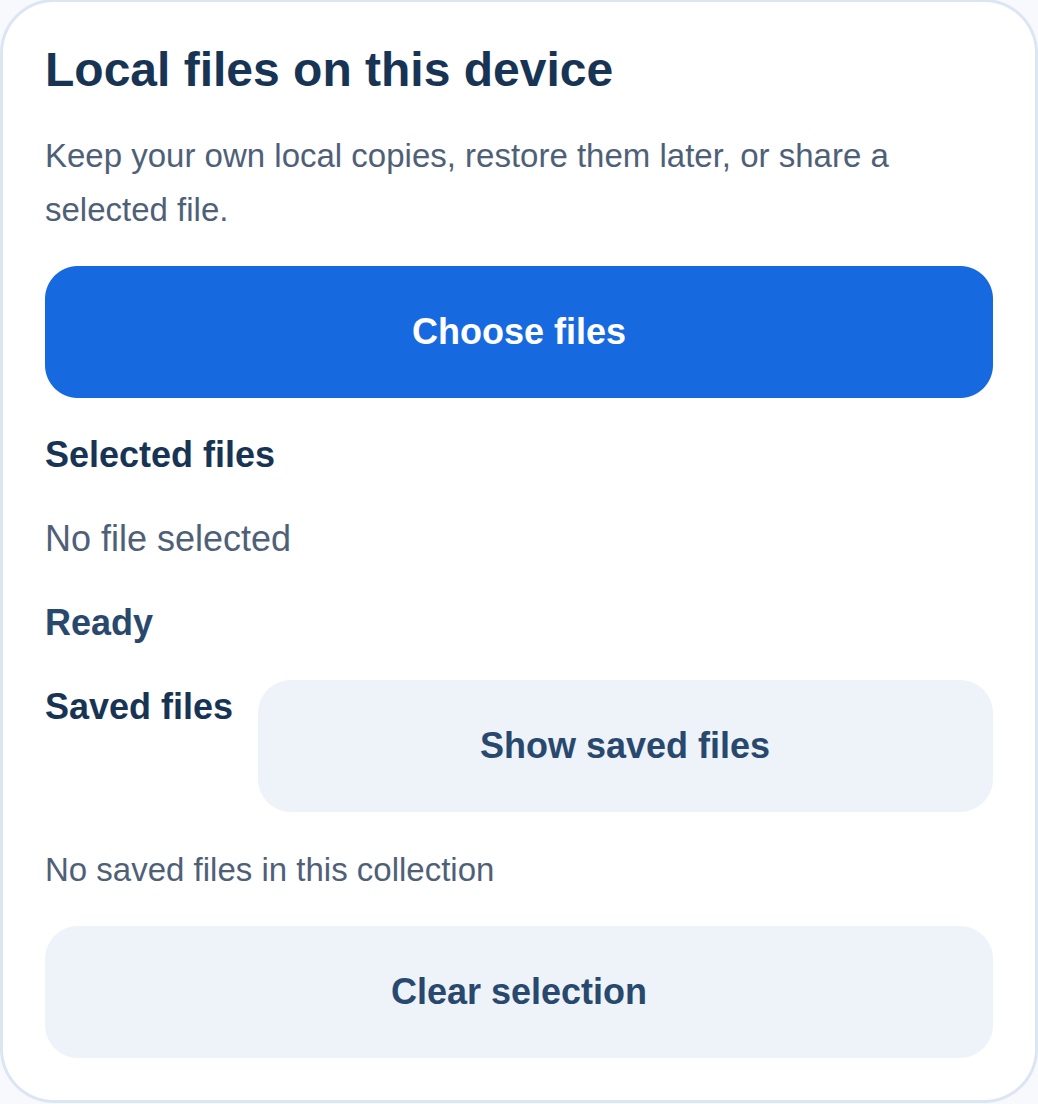
Keep report attachments and chosen files on the device, restore them later and let the user share a selected copy.
Public beta guides · Haptics instructions are in its Bubble listing
Public beta offer: free Bubble install · 7-day card trial, then US$1.50/month per plugin/project.
Documentation reviewed 6 November 2026
Practical examples
Stage several local attachments before submitting a report
A form needs to show which files were picked and let the user keep a managed copy before any cloud submission.
`accepted_mime_types_json = your allowed MIME list`; `multiple = yes`; set `max_files`, `max_file_bytes` and an account/report `document_context`.
Pick files → inspect the selected names/sizes → Save selection locally. Your form keeps the resulting file IDs until its separate Submit workflow uploads approved files.
Use `selection_count`, `file_names`, `file_sizes` and `saved_file_ids` to render the review list. A saved managed copy preserves the caller’s original.
A cancelled picker is not a submitted report. On `files_error`, keep already accepted local IDs and show `error_code`; never create a cloud attachment from a local URI alone.
Files stay on this device until shared or uploaded separately.
Keep a photo-editor or recorder output for later use
A generated local file may live in a temporary location; the app needs an explicit managed copy.
`source_uri = the local output of a separately accepted editor/recorder`; bind its real `display_name` and `mime_type`; use the same owner’s `document_context`.
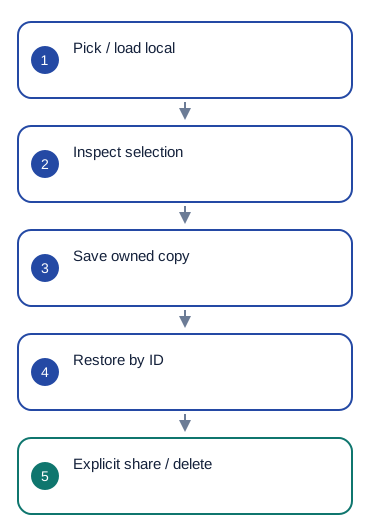
Load local source → inspect metadata → Save selection locally. Store the returned file ID only in the matching device/context, then Restore saved file by that exact ID when needed.
Consume `file_id`, `local_uri`, `size_bytes` and `is_saved_locally`; use `file_restored` to distinguish a completed restore from merely requesting one.
Reject a remote HTTP URL as a local source. If a source vanished or restoration fails, show `error_code` and preserve the original app record for recovery.
Files stay on this device until shared or uploaded separately.
Let a user share an app-generated local receipt or export
The app should hand a selected local file to the device share sheet rather than inventing a public URL.
`selected_file_id = the exact managed copy chosen from your app’s saved-file list`; its name and MIME describe the real local file.
List saved files → Restore saved file → Share selected file after the user taps Share. Keep the saved copy until they explicitly choose Delete saved copy.
Use `share_status` and `share_sheet_closed` to update the UI after the sheet closes. Retain the file ID for another deliberate share.
A closed share sheet is not proof that an email/message was delivered. Handle cancellation and `files_error` without reporting success to the recipient.
Files stay on this device until shared or uploaded separately.
What works now
Public beta. Use the documented controls and actions; test supported formats, permissions and device behavior in your own native app. Browser preview does not validate native device output.
Build the workflow
Use the available beta actions below and test the result on your target devices.
These examples use app records such as Lesson, Message and Order. Replace them with your own data types and element names. Example media addresses must be replaced with your own files.
Set document_context = Current User's unique id, or a stable value for the account and report. Choose accepted_mime_types_json, max_files and max_file_bytes.
Run Pick files, or use Load local source for a readable file produced by Photo Editor or Recorder. After selection_changed, read the matching file lists; Select picked file chooses an index.
Run Save selection locally. After files_saved, keep saved_file_ids in your app's local attachment record. List saved files shows saved copies; Restore saved file opens the selected saved ID.
Share selected file opens the system share menu. share_sheet_closed only means the menu closed. Delete saved copy needs the selected ID and confirm=yes.
Configure once
Create or choose your Bubble app project in BestPlugins → Dashboard → Plugins. Choose Xodera Offline Files Native, copy its key, then open Bubble → Plugins → Xodera Offline Files Native and paste it into licensing_api_key. Save once; then use the actions below. Each plugin in each project has its own key.
Use a native app with access to the chosen files. Set a stable document_context for the account or report so its saved files stay grouped correctly.
Configure once
- Create or choose your Bubble app project at BestPlugins → Dashboard → Plugins.
- Choose this plugin and copy its project key.
- Open Bubble → Plugins → this plugin. Paste its project key into licensing_api_key and save.
- Add the element, choose your app data and build the workflow below.
- In the dashboard, review and confirm the 7-day card trial for this plugin. It then costs US$1.50/month per app project, including development and production. Cancel before the trial ends to avoid the first charge.
Installation and subscription
For Audio Player, Video Player, Photo Editor, Audio Recorder, Files Kit and Haptics: free Bubble installation, a 7-day trial with a card, then US$1.50 per month per plugin and app project. Development and production are included, with no operation cap. File-size and feature limits still apply. Review billing and cancellation before confirming. Other plugins remain unavailable for purchase.
Save the result in your app
Example LocalAttachment: owner, document_context, saved file ID, display_name, mime_type and size_bytes. This ID works only on the same device and for the same account or report. For an online attachment, upload the file with a separate workflow and save the returned online file reference.
Failure, cancel and recovery
A cancelled picker returns operation_cancelled; it does not submit the form. While native_pending=yes, wait for the file picker or share menu to close before opening another. Clear session clears the current selection but keeps saved copies. If a file is missing, let the user choose it again.
Capabilities and limits
Choose 1–20 files at once. Per-file limit: 1 byte–256 MiB, with a lower limit if you choose. File-type filters do not check files for viruses. Device file IDs and paths do not work as cloud download links. Local copies are not encrypted storage and can be lost if app data is removed.
Settings, actions and results
Use these names in Bubble. Planned features are marked separately.
Available beta settings
Element settings
source_uri · textdisplay_name · textmime_type · textdocument_context · textselected_file_id · textaccepted_mime_types_json · textmultiple · yes_nocopy_to_cache · yes_nomax_files · numbermax_file_bytes · numberis_active · yes_nodisabled · yes_noshow_controls · yes_nolanguage · textui_text_json · texttitle · textStates
status · textis_busy · yes_nonative_pending · yes_nooperation · textselection_count · numberselected_index · numberfile_id · textlocal_uri · textdisplay_name · textmime_type · textmime_source · textsize_bytes · numberis_saved_locally · yes_nofile_ids · text (list)file_uris · text (list)file_names · text (list)file_mime_types · text (list)file_sizes · number (list)files_json · textsaved_count · numbersaved_file_ids · text (list)saved_file_uris · text (list)saved_file_names · text (list)saved_file_mime_types · text (list)saved_file_sizes · number (list)saved_files_json · textinvalid_saved_count · numbershare_status · texterror_code · textEvents
selection_changedfiles_savedlist_loadedfile_restoredfile_deletedshare_sheet_closedoperation_cancelledfiles_errorActions and their inputs
Pick filesLoad local sourceSelect picked fileSave selection locallyList saved filesRestore saved fileDelete saved copyShare selected fileCancel operationClear sessionElement settings · 16
source_uritext · Default: ""- Example value
file:///app-cache/report.pdf - Example Bubble expression
Photo Editor's output_uri - Readable file location on this device, returned by your picker or another plugin.
display_nametext · Default: ""- Example value
report-photo.jpg - Example Bubble expression
Selected Attachment's display_name - Use the current business record’s value; validate it against the limits below.
mime_typetext · Default: ""- Example value
image/jpeg - Example Bubble expression
Photo Editor's output_mime - Use the current business record’s value; validate it against the limits below.
document_contexttext · Default: "default"- Example value
<current-user-id> - Example Bubble expression
Current User's unique id - Stable value for this account or record. Use the same value when restoring its saved files or drafts.
selected_file_idtext · Default: ""- Example value
<returned saved file ID> - Example Bubble expression
Selected LocalAttachment's local_file_id - Use the current business record’s value; validate it against the limits below.
accepted_mime_types_jsontext · Default: "[\"*/*\"]"- Example value
["image/*","application/pdf"] - Example Bubble expression
Report Settings' accepted_mime_types_json - Use the current business record’s value; validate it against the limits below.
multipleyes_no · Default: false- Example value
yes - Example Bubble expression
Report Settings' allow_multiple_attachments - Use the current business record’s value; validate it against the limits below.
copy_to_cacheyes_no · Default: true- Example value
yes - Example Bubble expression
Report Settings' copy_to_cache - Use the current business record’s value; validate it against the limits below.
max_filesnumber · Default: 20- Example value
5 - Example Bubble expression
Report Settings' attachment_limit - Use the current business record’s value; validate it against the limits below.
max_file_bytesnumber · Default: 268435456- Example value
10485760 - Example Bubble expression
Report Settings' max_attachment_bytes - Use the current business record’s value; validate it against the limits below.
is_activeyes_no · Default: true- Example value
yes - Example Bubble expression
GuideHost's view_is_active (your yes/no custom state) - Set yes while this view is open. Set no when leaving, so playback or current work can stop.
disabledyes_no · Default: false- Example value
no - Example Bubble expression
GuideHost's is_busy (your yes/no custom state) - Disable the element while your app is busy or this action is unavailable.
show_controlsyes_no · Default: true- Example value
yes - Example Bubble expression
App Settings' show_editor_controls - Show or hide the built-in controls.
languagetext · Default: "auto"- Example value
uk - Example Bubble expression
Current User's preferred_language - Set language=auto to follow a supported device or browser language. Enter a supported language code to choose it explicitly.
ui_text_jsontext · Default: ""- Example value
{} - Example Bubble expression
App Settings' player_labels_json (supported keys only) - Optional JSON with supported button labels. Leave empty to use the built-in text.
titletext · Default: ""- Example value
Lesson 4 — review - Example Bubble expression
Selected Lesson's name - Visible app text; empty uses built-in localized copy where supported. No credentials.
Actions and their inputs · 10
Pick files
No action parameters
Load local source
source_uritext · Default: —- Example value
file:///app-cache/report.pdf - Example Bubble expression
Photo Editor's output_uri - Readable file location on this device, returned by your picker or another plugin.
display_nametext · Default: —- Example value
report-photo.jpg - Example Bubble expression
Selected Attachment's display_name - Use the current business record’s value; validate it against the limits below.
mime_typetext · Default: —- Example value
image/jpeg - Example Bubble expression
Photo Editor's output_mime - Use the current business record’s value; validate it against the limits below.
Select picked file
indexnumber · Default: —- Example value
0 - Example Bubble expression
Selected row's current_source_index - Use the current business record’s value; validate it against the limits below.
Save selection locally
No action parameters
List saved files
No action parameters
Restore saved file
file_idtext · Default: —- Example value
<returned saved file ID> - Example Bubble expression
Selected LocalAttachment's local_file_id - Use the current business record’s value; validate it against the limits below.
Delete saved copy
file_idtext · Default: —- Example value
<returned saved file ID> - Example Bubble expression
Selected LocalAttachment's local_file_id - Use the current business record’s value; validate it against the limits below.
confirmyes_no · Default: —- Example value
yes — explicit confirmation only - Example Bubble expression
Confirm Checkbox is checked - Use the current business record’s value; validate it against the limits below.
Share selected file
dialog_titletext · Default: —- Example value
Share attachment - Example Bubble expression
Selected Report's share_title - Use the current business record’s value; validate it against the limits below.
utitext · Default: —- Example value
"" - Example Bubble expression
Empty unless your iOS integration supplies a proven UTI - Use the current business record’s value; validate it against the limits below.
Cancel operation
No action parameters
Clear session
No action parameters
States and events
States
status · textCurrent result of this action. Use the matching completion event before saving success.
is_busy · yes_noWork is still in progress. Wait before starting another action.
native_pending · yes_noWork is still in progress. Wait before starting another action.
operation · textCurrent value for the selected item. Read it after the related event.
selection_count · numberCurrent value for the selected item. Read it after the related event.
selected_index · numberCurrent value for the selected item. Read it after the related event.
file_id · textIdentifier for this item or action. Keep it with the matching app record. Use the same request identifier when retrying an uncertain result.
local_uri · textFile location on this device. Save or upload the file separately if it must be kept online.
display_name · textCurrent value for the selected item. Read it after the related event.
mime_type · textCurrent value for the selected item. Read it after the related event.
mime_source · textCurrent value for the selected item. Read it after the related event.
size_bytes · numberCurrent value for the selected item. Read it after the related event.
is_saved_locally · yes_noCurrent value for the selected item. Read it after the related event.
file_ids · text (list)A list for the selected files. Items at the same index in the other file lists refer to the same file.
file_uris · text (list)A list for the selected files. Items at the same index in the other file lists refer to the same file.
file_names · text (list)A list for the selected files. Items at the same index in the other file lists refer to the same file.
file_mime_types · text (list)A list for the selected files. Items at the same index in the other file lists refer to the same file.
file_sizes · number (list)A list for the selected files. Items at the same index in the other file lists refer to the same file.
files_json · textCurrent value for the selected item. Read it after the related event.
saved_count · numberCurrent value for the selected item. Read it after the related event.
saved_file_ids · text (list)A list for the selected files. Items at the same index in the other file lists refer to the same file.
saved_file_uris · text (list)A list for the selected files. Items at the same index in the other file lists refer to the same file.
saved_file_names · text (list)A list for the selected files. Items at the same index in the other file lists refer to the same file.
saved_file_mime_types · text (list)A list for the selected files. Items at the same index in the other file lists refer to the same file.
saved_file_sizes · number (list)A list for the selected files. Items at the same index in the other file lists refer to the same file.
saved_files_json · textCurrent value for the selected item. Read it after the related event.
invalid_saved_count · numberCurrent value for the selected item. Read it after the related event.
share_status · textCurrent result of this action. Use the matching completion event before saving success.
error_code · textError information for the last action. Show a helpful message and offer the relevant retry.
Events
selection_changedWhen this event occurs, read the related states from the same element.
files_savedWhen this event occurs, read the related states from the same element.
list_loadedWhen this event occurs, read the related states from the same element.
file_restoredWhen this event occurs, read the related states from the same element.
file_deletedWhen this event occurs, read the related states from the same element.
share_sheet_closedWhen this event occurs, read the related states from the same element.
operation_cancelledWhen this event occurs, read the related states from the same element.
files_errorWhen this event occurs, read the related states from the same element.
Questions developers ask
Does Share mean “sent”?
No. The OS does not provide a reliable recipient-success receipt here. Show “share sheet closed”.
How does the subscription work?
For Audio Player, Video Player, Photo Editor, Audio Recorder, Files Kit and Haptics: free Bubble installation, a 7-day trial with a card, then US$1.50 per month per plugin and app project. Development and production are included, with no operation cap. File-size and feature limits still apply. Review billing and cancellation before confirming. Other plugins remain unavailable for purchase.
Related guides
For help, tell us which plugin and device you use, the action you tried and what happened. Use an example without personal data. Never share your key or private files.