Xodera Plugins · Bubble Native
Xodera Audio Recorder Native
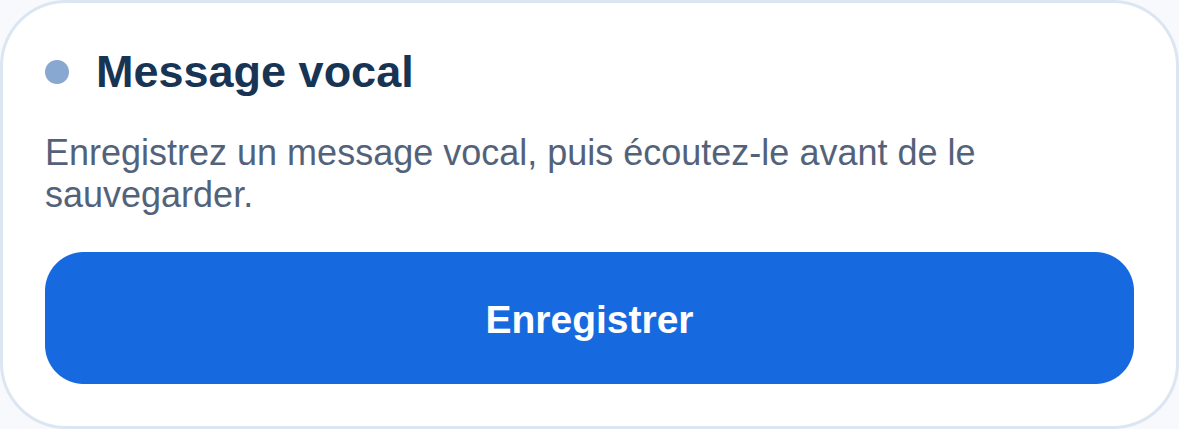
Let people record a voice note, listen before sending and keep a local draft. Upload only when they choose to send the recording.
Public beta guides · Haptics instructions are in its Bubble listing
Public beta offer: free Bubble install · 7-day card trial, then US$1.50/month per plugin/project.
Documentation reviewed 6 November 2026
Practical examples
Listen before sending a non-confidential voice message
Users need a chance to hear and replace a recording before it becomes an attachment.
`title = the app’s conversation label`; set `max_duration_seconds` and `max_upload_bytes` to your message policy.
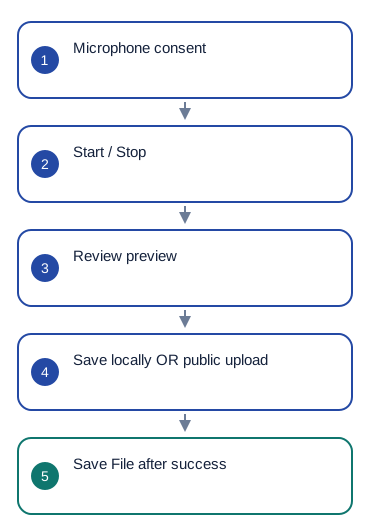
Start recording → Stop recording → wait for `recording_ready` → Play preview. Offer Seek preview and Set preview speed. Only an explicit Send invokes Upload to Bubble on the accepted own-app upload endpoint.
Only on `upload_succeeded`, create your Message and set its audio field to `uploaded_file`. The message is not created by the recorder itself.
On microphone denial show `permission_status`; on upload failure keep the local recording. Check the result of an unknown upload before retrying so Send cannot create duplicate attachments/messages.
Bubble upload creates a public audio file. Do not use this upload for confidential recordings.
Pronunciation practice without an immediate upload
Learners want to compare their own spoken response with a lesson before deciding to submit it.
`title = Current Exercise’s prompt`; `max_duration_seconds = the exercise limit`; an exercise answer remains an app-owned record.
Record → Stop → Play preview. Let the learner seek, slow the preview or cancel and record another attempt. Save locally only when they choose to keep the draft.
`duration`, `local_uri`, `mime_type` and `draft_id` describe the attempt. Your app decides whether it remains local or is later submitted through your chosen upload workflow.
On `preview_error`, preserve the draft and show `error_code`. Do not turn a preview or saved draft into a submitted Answer until the app’s submission workflow succeeds.
Bubble upload creates a public audio file. Do not use this upload for confidential recordings.
Keep a local voice draft and make Send explicit
A field worker can be interrupted before finishing a note and should not have to upload it just to keep it.
`saved_draft_id = the draft ID stored by your app for this device and account`; `title = the selected non-sensitive task label`.
Start/Stop recording → Save locally. Store the returned `draft_id` in your own device/account-scoped state. Use Restore local draft for that same ID, then Play preview before deciding whether to upload.
On `local_saved` or `local_restored`, inspect `is_saved_locally`, `local_uri` and `duration`. Only delete the saved draft after explicit user choice or after a separately confirmed retention policy.
If restore fails, show `error_code` and keep the ID for diagnosis; do not report an empty or different recording as restored. Never auto-upload on reconnect.
Bubble upload creates a public audio file. Do not use this upload for confidential recordings.
What works now
Public beta. Use the documented controls and actions; test supported formats, permissions and device behavior in your own native app. Browser preview does not validate native device output.
Build the workflow
Use the available beta actions below and test the result on your target devices.
These examples use app records such as Lesson, Message and Order. Replace them with your own data types and element names. Example media addresses must be replaced with your own files.
Add the recorder. Set document_context = Current User's unique id and is_active to whether the recording view is open.
Start recording asks for microphone permission. Pause and Resume keep the same take. Stop recording finishes it; wait for recording_ready before offering review or upload.
Use the preview controls to listen. Save locally keeps a draft on this device; after local_saved, retain draft_id for Restore local draft.
Explain that sending creates a public file. Set bubble_upload_url to your own Bubble app's correct Development or Live file-upload address. Run Upload to Bubble only when the user chooses Send; on upload_succeeded, save uploaded_file in your record.
Configure once
Create or choose your Bubble app project in BestPlugins → Dashboard → Plugins. Choose Xodera Audio Recorder Native, copy its key, then open Bubble → Plugins → Xodera Audio Recorder Native and paste it into licensing_api_key. Save once; then use the actions below. Each plugin in each project has its own key.
Ask for microphone permission when the user starts recording. Choose how the app will save drafts. Bubble upload stores a public file, so use it only for audio suitable for public storage.
Configure once
- Create or choose your Bubble app project at BestPlugins → Dashboard → Plugins.
- Choose this plugin and copy its project key.
- Open Bubble → Plugins → this plugin. Paste its project key into licensing_api_key and save.
- Add the element, choose your app data and build the workflow below.
- In the dashboard, review and confirm the 7-day card trial for this plugin. It then costs US$1.50/month per app project, including development and production. Cancel before the trial ends to avoid the first charge.
Installation and subscription
For Audio Player, Video Player, Photo Editor, Audio Recorder, Files Kit and Haptics: free Bubble installation, a 7-day trial with a card, then US$1.50 per month per plugin and app project. Development and production are included, with no operation cap. File-size and feature limits still apply. Review billing and cancellation before confirming. Other plugins remain unavailable for purchase.
Save the result in your app
After upload_succeeded, set VoiceMessage.audio = Recorder's uploaded_file, owner = Current User, duration = Recorder's duration and mime_type = Recorder's mime_type. draft_id restores a draft on this device; it is not an online audio file.
Failure, cancel and recovery
If microphone access is denied, explain how to enable it in device settings. Cancel recording discards the unsaved take; saved drafts remain. If an upload is interrupted, keep the local recording and check whether the file arrived before sending it again. Delete saved draft removes only the selected saved draft.
Capabilities and limits
Default maximum recording: 300 seconds; configurable 1–3600. Default upload limit: 10 MiB; maximum 30 MiB. Upload timeout: 60 seconds, with no automatic retry. Bubble uploads are public. Only your own *.bubbleapps.io file-upload addresses are supported; custom domains are not. Local drafts are not encrypted storage.
Settings, actions and results
Use these names in Bubble. Planned features are marked separately.
Available beta settings
Element settings
title · textmax_duration_seconds · numbermax_upload_bytes · numberis_active · yes_nodisabled · yes_noui_text_json · textsaved_draft_id · textbubble_upload_url · textlanguage · textdocument_context · textStates
recorder_status · textpermission_status · textis_recording · yes_nois_paused · yes_noduration · numberlocal_uri · textdraft_id · textis_saved_locally · yes_nomime_type · textfile_size · numberwaveform_peaks_json · textpreview_status · textpreview_is_playing · yes_nopreview_current_time · numberupload_status · textupload_progress · numberuploaded_url · textuploaded_file · fileerror_code · textEvents
recording_startedrecording_pausedrecording_resumedrecording_stoppedrecording_readyrecording_cancelledrecorder_errorlocal_savedlocal_restoredlocal_deletedupload_succeededupload_failedupload_cancelledpreview_readypreview_errorActions and their inputs
Start recordingPause recordingResume recordingStop recordingCancel recordingSave locallyRestore local draftDelete saved draftUpload to BubbleCancel uploadPlay previewPause previewStop previewSeek previewSet preview speedElement settings · 10
titletext · Default: ""- Example value
Lesson 4 — review - Example Bubble expression
Selected Lesson's name - Visible app text; empty uses built-in localized copy where supported. No credentials.
max_duration_secondsnumber · Default: 300- Example value
300 - Example Bubble expression
Voice Settings' max_seconds - Use the current business record’s value; validate it against the limits below.
max_upload_bytesnumber · Default: 10485760- Example value
10485760 - Example Bubble expression
Voice Settings' max_upload_bytes - Use the current business record’s value; validate it against the limits below.
is_activeyes_no · Default: true- Example value
yes - Example Bubble expression
GuideHost's view_is_active (your yes/no custom state) - Set yes while this view is open. Set no when leaving, so playback or current work can stop.
disabledyes_no · Default: false- Example value
no - Example Bubble expression
GuideHost's is_busy (your yes/no custom state) - Disable the element while your app is busy or this action is unavailable.
ui_text_jsontext · Default: ""- Example value
{} - Example Bubble expression
App Settings' player_labels_json (supported keys only) - Optional JSON with supported button labels. Leave empty to use the built-in text.
saved_draft_idtext · Default: ""- Example value
<returned draft_id> - Example Bubble expression
Selected VoiceDraft's draft_id - Use the current business record’s value; validate it against the limits below.
bubble_upload_urltext · Default: ""- Example value
https://your-app.bubbleapps.io/version-test/fileupload - Example Bubble expression
App Settings' selected_bubble_upload_url - Your own Bubble app file-upload address: /version-test/fileupload for Development, /fileupload for Live. This upload creates public files.
languagetext · Default: "auto"- Example value
uk - Example Bubble expression
Current User's preferred_language - Set language=auto to follow a supported device or browser language. Enter a supported language code to choose it explicitly.
document_contexttext · Default: ""- Example value
<current-user-id> - Example Bubble expression
Current User's unique id - Stable value for this account or record. Use the same value when restoring its saved files or drafts.
Actions and their inputs · 15
Start recording
No action parameters
Pause recording
No action parameters
Resume recording
No action parameters
Stop recording
No action parameters
Cancel recording
No action parameters
Save locally
No action parameters
Restore local draft
draft_idtext · Default: —- Example value
<returned draft_id> - Example Bubble expression
Selected VoiceDraft's draft_id - Use the current business record’s value; validate it against the limits below.
Delete saved draft
draft_idtext · Default: —- Example value
<returned draft_id> - Example Bubble expression
Selected VoiceDraft's draft_id - Use the current business record’s value; validate it against the limits below.
Upload to Bubble
No action parameters
Cancel upload
No action parameters
Play preview
No action parameters
Pause preview
No action parameters
Stop preview
No action parameters
Seek preview
secondsnumber · Default: —- Example value
12 - Example Bubble expression
Selected Comment's seconds - Use the current business record’s value; validate it against the limits below.
Set preview speed
ratenumber · Default: —- Example value
1.5 - Example Bubble expression
Preview Speed Dropdown's value - Use the current business record’s value; validate it against the limits below.
States and events
States
recorder_status · textCurrent result of this action. Use the matching completion event before saving success.
permission_status · textCurrent result of this action. Use the matching completion event before saving success.
is_recording · yes_noCurrent value for the selected item. Read it after the related event.
is_paused · yes_noCurrent value for the selected item. Read it after the related event.
duration · numberCurrent value for the selected item. Read it after the related event.
local_uri · textFile location on this device. Save or upload the file separately if it must be kept online.
draft_id · textIdentifier for this item or action. Keep it with the matching app record. Use the same request identifier when retrying an uncertain result.
is_saved_locally · yes_noCurrent value for the selected item. Read it after the related event.
mime_type · textCurrent value for the selected item. Read it after the related event.
file_size · numberCurrent value for the selected item. Read it after the related event.
waveform_peaks_json · textCurrent value for the selected item. Read it after the related event.
preview_status · textCurrent result of this action. Use the matching completion event before saving success.
preview_is_playing · yes_noCurrent value for the selected item. Read it after the related event.
preview_current_time · numberCurrent value for the selected item. Read it after the related event.
upload_status · textCurrent result of this action. Use the matching completion event before saving success.
upload_progress · numberCurrent value for the selected item. Read it after the related event.
uploaded_url · textCurrent value for the selected item. Read it after the related event.
uploaded_file · fileFile returned after upload_succeeded. Save it in your Bubble File field.
error_code · textError information for the last action. Show a helpful message and offer the relevant retry.
Events
recording_startedWhen this event occurs, read the related states from the same element.
recording_pausedWhen this event occurs, read the related states from the same element.
recording_resumedWhen this event occurs, read the related states from the same element.
recording_stoppedWhen this event occurs, read the related states from the same element.
recording_readyWhen this event occurs, read the related states from the same element.
recording_cancelledWhen this event occurs, read the related states from the same element.
recorder_errorWhen this event occurs, read the related states from the same element.
local_savedWhen this event occurs, read the related states from the same element.
local_restoredWhen this event occurs, read the related states from the same element.
local_deletedWhen this event occurs, read the related states from the same element.
upload_succeededWhen this event occurs, read the related states from the same element.
upload_failedWhen this event occurs, read the related states from the same element.
upload_cancelledWhen this event occurs, read the related states from the same element.
preview_readyWhen this event occurs, read the related states from the same element.
preview_errorWhen this event occurs, read the related states from the same element.
Questions developers ask
Does local save upload the recording?
No. Save locally keeps an owned device draft. Upload to Bubble is a separate explicit public operation.
How does the subscription work?
For Audio Player, Video Player, Photo Editor, Audio Recorder, Files Kit and Haptics: free Bubble installation, a 7-day trial with a card, then US$1.50 per month per plugin and app project. Development and production are included, with no operation cap. File-size and feature limits still apply. Review billing and cancellation before confirming. Other plugins remain unavailable for purchase.
Related guides
For help, tell us which plugin and device you use, the action you tried and what happened. Use an example without personal data. Never share your key or private files.