Xodera Plugins · Bubble Native
Xodera B2 Files Native
Keep app attachments in your own Backblaze B2 storage. Let permitted users upload, browse and download files, and choose explicitly when a file may be shared publicly.
Public beta guides · Haptics instructions are in its Bubble listing
Public beta offer: free Bubble install · 7-day card trial, then US$1.50/month per plugin/project.
Documentation reviewed 6 November 2026
Practical examples
Store a job attachment in the developer’s own private bucket
A Bubble Job needs a durable storage reference without treating an expiring download URL as the file identity.
`bucket_binding_id = an allowed binding to your own private bucket`; dynamic `local_uri`, `display_name`, `mime_type` and `expected_size` describe the selected local file.
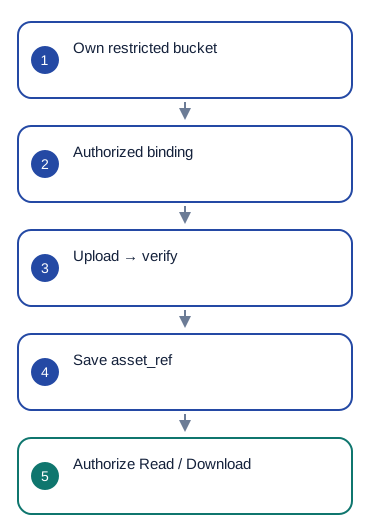
Planned: Check local source → Upload file → wait for `upload_verified`. Your workflow then stores `asset_ref` and metadata on the owned Job record.
Use `asset_ref`, `size_bytes`, `mime_type` and `upload_status`. Later, Resolve private read can provide a temporary URL for an authorized use.
If database save fails after `upload_verified`, retry the DB update with the same asset reference rather than another upload. Check the result of `upload_pending` using Check or recover upload status and the same upload ID.
Planned. Your B2 account pays storage and download charges.
Build an owned attachment gallery with durable file records
A file gallery needs names, types and pagination as well as a way to open the selected asset later.
Your app’s File record stores an accepted `asset_ref`, display name, MIME and owner/job relation after a verified upload; do not use a local URI as its cloud identity.
Planned: use List my B2 files to build the attachment list. asset_refs identifies the files; values at the same index provide their names and types. Selecting a file passes its asset_ref to Get asset metadata or Download accepted version.
`has_more` and `next_cursor` belong to the current query. A completed download returns `local_output_uri`; it is a device-local copy, not a permanent public link.
Reset pagination after binding/account/query changes. On `transfer_error`, preserve the existing File Thing and show `error_code`; do not silently replace it with another provider version.
Planned. Your B2 account pays storage and download charges.
Make publication and exact-version deletion deliberate
Staff should not accidentally expose a private attachment or delete every version when replacing an image.
`asset_ref = the selected accepted version`; bucket binding and the app’s file permissions must allow the requested operation.
Show the current visibility, ask for explicit confirmation, then Change public sharing. For removal, call Delete accepted version with confirmation; keep app metadata until the confirmed outcome is known.
After `share_changed`, consume `visibility` and `public_url` only when public sharing was explicitly authorized. After `delete_completed`, update the owned File record; `delete_pending` is not final deletion.
Check the result of an uncertain operation instead of assuming success. Previously issued provider read URLs may remain valid until expiry; removing a DB row or disabling sharing does not recall bytes already downloaded.
Planned. Your B2 account pays storage and download charges.
What works now
Planned plugin. It is not installed or available for use yet. The guide below shows the intended file workflow.
Build the workflow
Planned
Planned workflow. Not available in the current beta yet.
These examples use app records such as Lesson, Message and Order. Replace them with your own data types and element names. Example media addresses must be replaced with your own files.
Planned: in your project settings, choose your B2 storage and allowed bucket. Set its privacy, folder prefix and accepted file types and sizes.
Use List B2 bindings to show allowed storage choices. Use List my B2 files to show the current user's files and Get my B2 file info for details.
Choose a file. Set bucket_binding_id, local_uri, display_name, mime_type and expected_size, then run Upload file. Show progress, but wait for upload_verified before treating the file as saved.
Save asset_ref in your app record. Use it for Get asset metadata, Resolve private read or Download accepted version. Change public sharing and Delete accepted version require a separate confirmation.
Configure once
Key activation is planned for this plugin. Create or choose your Bubble app project in BestPlugins → Dashboard → Plugins. Choose Xodera B2 Files Native, copy its key, then open Bubble → Plugins → Xodera B2 Files Native and paste it into project_api_key. Save once; then use the actions below. Each plugin in each project has its own key.
Use your own Backblaze B2 account and choose the bucket for this app. Decide who may read and upload files. Store the names of the relevant User yes/no fields in b2_reader_permission_field and b2_writer_permission_field; defaults are b2_files_reader and b2_files_writer. Only an authorized administrator should change those user permissions.
Configure once
- Create or choose your Bubble app project at BestPlugins → Dashboard → Plugins.
- Choose this plugin and copy its project key.
- Planned: Open Bubble → Plugins → Xodera B2 Files Native; paste the key into project_api_key and save.
- Add the element, choose your app data and build the workflow below.
- Private beta access only for now. Public installation and paid activation are not open yet.
Installation and subscription
For Audio Player, Video Player, Photo Editor, Audio Recorder, Files Kit and Haptics: free Bubble installation, a 7-day trial with a card, then US$1.50 per month per plugin and app project. Development and production are included, with no operation cap. File-size and feature limits still apply. Review billing and cancellation before confirming. Other plugins remain unavailable for purchase.
Save the result in your app
Example Attachment: asset_ref, related report/order, owner, display_name, mime_type and size_bytes. Save these after upload_verified. Use asset_ref to reopen a file later; a temporary read address or a path on one device is not a permanent file reference. If saving the database record fails, retry saving that record rather than uploading the file again.
Failure, cancel and recovery
If an upload result is unknown, keep upload_id and use Check or recover upload status. Do not upload another copy automatically. Cancel affects the unfinished transfer, not an already saved file. If access expires, request the file again instead of reusing an old temporary address.
Capabilities and limits
Planned maximum file size: 256 MiB, or a lower bucket limit you choose. Backblaze storage and download charges belong to your B2 account. Files in a public bucket are public even when the related app record is private. No virus-scanning promise, multipart upload, pause or recovery after app termination.
Settings, actions and results
Use these names in Bubble. Planned features are marked separately.
Available beta settings
Element settings
bucket_binding_id · textlocal_uri · textdisplay_name · textmime_type · textexpected_size · numbermetadata_json · textasset_ref · textis_active · yes_nodisabled · yes_nolanguage · textui_text_json · texttitle · textshow_preview · yes_noshow_provider_browse · yes_noStates
status · textis_busy · yes_noupload_id · textupload_status · textasset_ref · textdisplay_name · textmime_type · textsize_bytes · numberbytes_sent · numberprogress · numberprogress_indeterminate · yes_notemporary_read_url · textread_expires_at · textlocal_output_uri · textpublic_url · textvisibility · textnext_cursor · texthas_more · yes_noquery_revision · textfiles_json · textbuckets_json · textremote_files_json · textremote_next_cursor · textremote_has_more · yes_noremote_query_revision · textbucket_binding_id · textcleanup_pending · yes_noerror_code · texterror_message · textEvents
file_selectedupload_startedupload_transport_completedupload_verifiedupload_pendingbuckets_loadedbucket_selectedlist_loadedmetadata_loadedread_resolveddownload_completedshare_changeddelete_completeddelete_pendingbrowse_loadedtransfer_cancelledcleanup_pendingtransfer_errorsession_clearedActions and their inputs
List allowed bucketsSelect bucket bindingCheck local sourceUpload fileCheck or recover upload statusCancel owned transferClear local sessionList application filesRefresh application filesLoad more application filesSelect asset referenceGet asset metadataResolve private readDownload accepted versionBrowse provider filesChange public sharingDelete accepted versionElement settings · 14
Planned workflow. Not available in the current beta yet.
bucket_binding_idtext · Default: ""- Example value
<binding returned by List B2 bindings> - Example Bubble expression
Selected Binding's binding_id - Storage choice returned by List B2 bindings. Use its ID for this file.
local_uritext · Default: ""- Example value
file:///app-cache/attachment.jpg - Example Bubble expression
Offline Files' local_uri - Readable file location on this device. It is not an online download link.
display_nametext · Default: ""- Example value
report-photo.jpg - Example Bubble expression
Selected Attachment's display_name - Use the current business record’s value; validate it against the limits below.
mime_typetext · Default: ""- Example value
image/jpeg - Example Bubble expression
Photo Editor's output_mime - Use the current business record’s value; validate it against the limits below.
expected_sizenumber · Default: 0- Example value
246975 - Example Bubble expression
Offline Files' size_bytes - Use the current business record’s value; validate it against the limits below.
metadata_jsontext · Default: ""- Example value
{"label":"field-report"} - Example Bubble expression
Selected Attachment's safe_metadata_json - Optional JSON with app information such as a report label. Keep it small and avoid personal data.
asset_reftext · Default: ""- Example value
<returned asset_ref> - Example Bubble expression
Selected B2Asset's asset_ref - Stable opaque accepted-asset identity from the service. Selecting it never bypasses user authorization.
is_activeyes_no · Default: true- Example value
yes - Example Bubble expression
GuideHost's view_is_active (your yes/no custom state) - Set yes while this view is open. Set no when leaving, so playback or current work can stop.
disabledyes_no · Default: false- Example value
no - Example Bubble expression
GuideHost's is_busy (your yes/no custom state) - Disable the element while your app is busy or this action is unavailable.
languagetext · Default: "auto"- Example value
uk - Example Bubble expression
Current User's preferred_language - Set language=auto to follow a supported device or browser language. Enter a supported language code to choose it explicitly.
ui_text_jsontext · Default: ""- Example value
{} - Example Bubble expression
App Settings' player_labels_json (supported keys only) - Optional JSON with supported button labels. Leave empty to use the built-in text.
titletext · Default: ""- Example value
Lesson 4 — review - Example Bubble expression
Selected Lesson's name - Visible app text; empty uses built-in localized copy where supported. No credentials.
show_previewyes_no · Default: false- Example value
yes - Example Bubble expression
App Settings' b2_preview - Show or hide the file preview.
show_provider_browseyes_no · Default: false- Example value
no - Example Bubble expression
Current User's authorized_browse_UI (presentation only) - Show or hide the storage browsing controls for permitted users.
Actions and their inputs · 20
Planned workflow. Not available in the current beta yet.
List allowed buckets
No action parameters
Select bucket binding
binding_idtext · Default: —- Example value
<returned allowed binding ID> - Example Bubble expression
Selected Binding's binding_id - Use the current business record’s value; validate it against the limits below.
Check local source
No action parameters
Upload file
acknowledge_public_bytesyes_no · Default: —- Example value
no - Example Bubble expression
Public bucket disclosure Checkbox is checked (private bucket: no) - Use the current business record’s value; validate it against the limits below.
confirm_retryyes_no · Default: —- Example value
no - Example Bubble expression
Retry Checkbox is checked after confirmed clean pending status - Use the current business record’s value; validate it against the limits below.
Check or recover upload status
upload_idtext · Default: —- Example value
<original returned upload_id> - Example Bubble expression
Current UploadIntent's upload_id - Use the current business record’s value; validate it against the limits below.
Cancel owned transfer
No action parameters
Clear local session
No action parameters
List application files
No action parameters
Refresh application files
No action parameters
Load more application files
No action parameters
Select asset reference
asset_reftext · Default: —- Example value
<returned asset_ref> - Example Bubble expression
Selected B2Asset's asset_ref - Stable opaque accepted-asset identity from the service. Selecting it never bypasses user authorization.
Get asset metadata
asset_reftext · Default: —- Example value
<returned asset_ref> - Example Bubble expression
Selected B2Asset's asset_ref - Stable opaque accepted-asset identity from the service. Selecting it never bypasses user authorization.
Resolve private read
asset_reftext · Default: —- Example value
<returned asset_ref> - Example Bubble expression
Selected B2Asset's asset_ref - Stable opaque accepted-asset identity from the service. Selecting it never bypasses user authorization.
Download accepted version
asset_reftext · Default: —- Example value
<returned asset_ref> - Example Bubble expression
Selected B2Asset's asset_ref - Stable opaque accepted-asset identity from the service. Selecting it never bypasses user authorization.
Browse provider files
prefixtext · Default: —- Example value
"" - Example Bubble expression
Authorized Browse Settings' prefix - Use the current business record’s value; validate it against the limits below.
load_moreyes_no · Default: —- Example value
no - Example Bubble expression
Load More button only, for unchanged query - Use the current business record’s value; validate it against the limits below.
Change public sharing
asset_reftext · Default: —- Example value
<returned asset_ref> - Example Bubble expression
Selected B2Asset's asset_ref - Stable opaque accepted-asset identity from the service. Selecting it never bypasses user authorization.
enabledyes_no · Default: —- Example value
no - Example Bubble expression
Public Share Checkbox is checked after separate confirmation - Use the current business record’s value; validate it against the limits below.
confirmyes_no · Default: —- Example value
yes — explicit confirmation only - Example Bubble expression
Confirm Checkbox is checked - Use the current business record’s value; validate it against the limits below.
Delete accepted version
asset_reftext · Default: —- Example value
<returned asset_ref> - Example Bubble expression
Selected B2Asset's asset_ref - Stable opaque accepted-asset identity from the service. Selecting it never bypasses user authorization.
confirmyes_no · Default: —- Example value
yes — explicit confirmation only - Example Bubble expression
Confirm Checkbox is checked - Use the current business record’s value; validate it against the limits below.
List B2 bindings
environmenttext · Default: —- Example value
development - Example Bubble expression
App Settings' selected_environment - Use the current business record’s value; validate it against the limits below.
Returns
ok · yes/nostatus · texterror_code · textbinding_ids · text listlabels · text listprivacy · text listmax_size_bytes · number listList my B2 files
environmenttext · Default: —- Example value
development - Example Bubble expression
App Settings' selected_environment - Use the current business record’s value; validate it against the limits below.
binding_idtext · Default: —- Example value
<returned allowed binding ID> - Example Bubble expression
Selected Binding's binding_id - Use the current business record’s value; validate it against the limits below.
limitnumber · Default: —- Example value
50 - Example Bubble expression
Gallery Settings' page_size - Use the current business record’s value; validate it against the limits below.
cursortext · Default: —- Example value
"" - Example Bubble expression
Previous List my B2 files result's next_cursor; empty on first page - Use the current business record’s value; validate it against the limits below.
Returns
ok · yes/nostatus · texterror_code · textasset_refs · text listdisplay_names · text listmime_types · text listsize_bytes · number listcreated_ats · text listvisibility · text listpublic_urls · text listprovider_status · text listinspection_status · text listmetadata_labels · text listhas_more · yes/nonext_cursor · textquery_revision · textGet my B2 file info
environmenttext · Default: —- Example value
development - Example Bubble expression
App Settings' selected_environment - Use the current business record’s value; validate it against the limits below.
binding_idtext · Default: —- Example value
<returned allowed binding ID> - Example Bubble expression
Selected Binding's binding_id - Use the current business record’s value; validate it against the limits below.
asset_reftext · Default: —- Example value
<returned asset_ref> - Example Bubble expression
Selected B2Asset's asset_ref - Stable opaque accepted-asset identity from the service. Selecting it never bypasses user authorization.
Returns
ok · yes/nostatus · texterror_code · textasset_ref · textdisplay_name · textmime_type · textsize_bytes · numbercreated_at · textvisibility · textpublic_url · textprovider_status · textinspection_status · textmetadata_label · textStates and events
Planned workflow. Not available in the current beta yet.
States
status · textCurrent result of this action. Use the matching completion event before saving success.
is_busy · yes_noWork is still in progress. Wait before starting another action.
upload_id · textIdentifier for this item or action. Keep it with the matching app record. Use the same request identifier when retrying an uncertain result.
upload_status · textCurrent result of this action. Use the matching completion event before saving success.
asset_ref · textIdentifier for this item or action. Keep it with the matching app record. Use the same request identifier when retrying an uncertain result.
display_name · textCurrent value for the selected item. Read it after the related event.
mime_type · textCurrent value for the selected item. Read it after the related event.
size_bytes · numberCurrent value for the selected item. Read it after the related event.
bytes_sent · numberCurrent value for the selected item. Read it after the related event.
progress · numberCurrent value for the selected item. Read it after the related event.
progress_indeterminate · yes_noCurrent value for the selected item. Read it after the related event.
temporary_read_url · textCurrent value for the selected item. Read it after the related event.
read_expires_at · textCurrent value for the selected item. Read it after the related event.
local_output_uri · textFile location on this device. Save or upload the file separately if it must be kept online.
public_url · textCurrent value for the selected item. Read it after the related event.
visibility · textCurrent value for the selected item. Read it after the related event.
next_cursor · textCurrent value for the selected item. Read it after the related event.
has_more · yes_noCurrent value for the selected item. Read it after the related event.
query_revision · textCurrent value for the selected item. Read it after the related event.
files_json · textCurrent value for the selected item. Read it after the related event.
buckets_json · textCurrent value for the selected item. Read it after the related event.
remote_files_json · textCurrent value for the selected item. Read it after the related event.
remote_next_cursor · textCurrent value for the selected item. Read it after the related event.
remote_has_more · yes_noCurrent value for the selected item. Read it after the related event.
remote_query_revision · textCurrent value for the selected item. Read it after the related event.
bucket_binding_id · textIdentifier for this item or action. Keep it with the matching app record. Use the same request identifier when retrying an uncertain result.
cleanup_pending · yes_noCurrent value for the selected item. Read it after the related event.
error_code · textError information for the last action. Show a helpful message and offer the relevant retry.
error_message · textError information for the last action. Show a helpful message and offer the relevant retry.
Events
file_selectedWhen this event occurs, read the related states from the same element.
upload_startedWhen this event occurs, read the related states from the same element.
upload_transport_completedWhen this event occurs, read the related states from the same element.
upload_verifiedWhen this event occurs, read the related states from the same element.
upload_pendingWhen this event occurs, read the related states from the same element.
buckets_loadedWhen this event occurs, read the related states from the same element.
bucket_selectedWhen this event occurs, read the related states from the same element.
list_loadedWhen this event occurs, read the related states from the same element.
metadata_loadedWhen this event occurs, read the related states from the same element.
read_resolvedWhen this event occurs, read the related states from the same element.
download_completedWhen this event occurs, read the related states from the same element.
share_changedWhen this event occurs, read the related states from the same element.
delete_completedWhen this event occurs, read the related states from the same element.
delete_pendingWhen this event occurs, read the related states from the same element.
browse_loadedWhen this event occurs, read the related states from the same element.
transfer_cancelledWhen this event occurs, read the related states from the same element.
cleanup_pendingWhen this event occurs, read the related states from the same element.
transfer_errorWhen this event occurs, read the related states from the same element.
session_clearedWhen this event occurs, read the related states from the same element.
Questions developers ask
Can I save the temporary read URL as my file?
No. Persist asset_ref and canonical metadata. Reauthorize reads; a device download path is not a Bubble File.
How does the subscription work?
Planned pricing: installing the plugin in Bubble is free. BestPlugins access is a separate subscription for each plugin in each Bubble app project: 7 days free, then US$1.50 per month. Development and Live are included. There is no fixed limit on the number of operations; file-size and feature limits still apply. Checkout is not open yet. The activation screen will show the first billing date and cancellation terms.
Related guides
Marketplace release pending
Forum guide not posted
For help, tell us which plugin and device you use, the action you tried and what happened. Use an example without personal data. Never share your key or private files.