 Відкрити повний знімок
XODERA / NATIVE LABВідкритий посібник • без входу
Нативні плагіни • бета
Нативні інструменти.Побачте результат.
Перегляньте п’ять мобільних експериментів Bubble, справжні результати на Android та інструкції підключення до даних і workflows вашого застосунку. Посібник відкритий; інтерактивний нативний доступ має окремі обмеження.
Це прев’ю лише для розробників: Bubble вимагає вхід як співавтор цього застосунку. Посібник і знімки відкриті без облікового запису. Анонімний інтерактивний симулятор очікує перевіреної публічної збірки.
Native Video Player ANDROID
 Відкрити повний знімок
NATIVE / ANDROID
Справжні екрани. Чіткі обмеження.
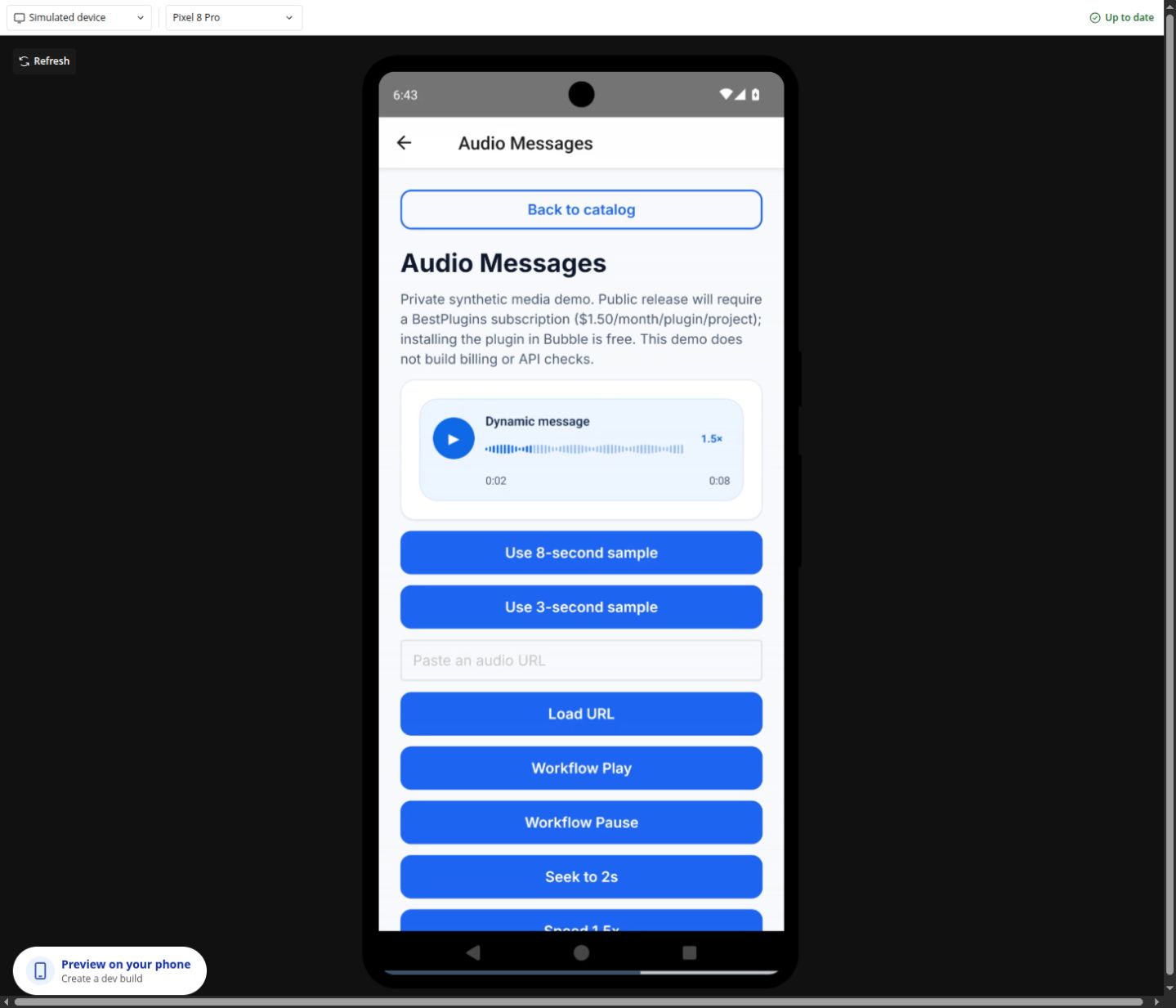
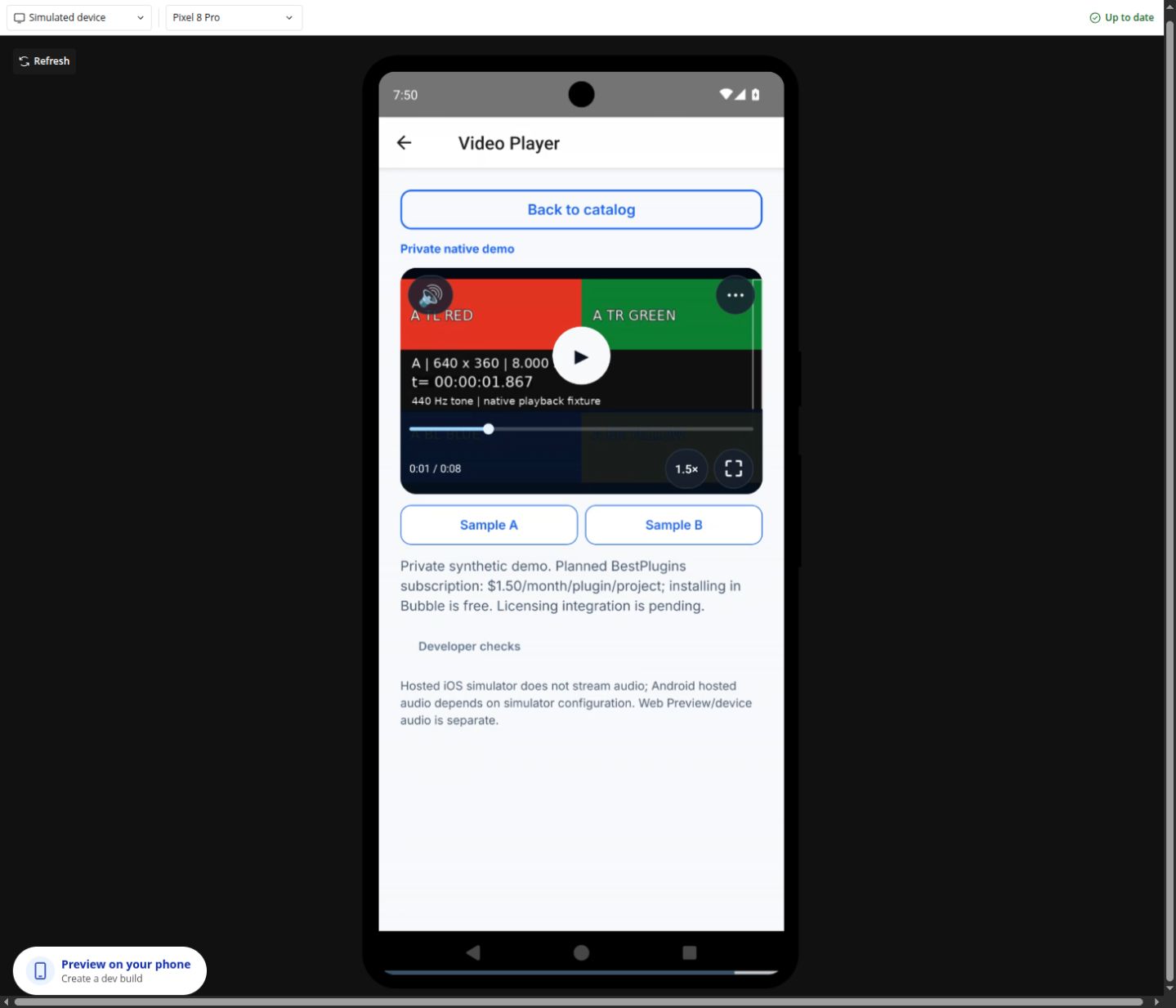
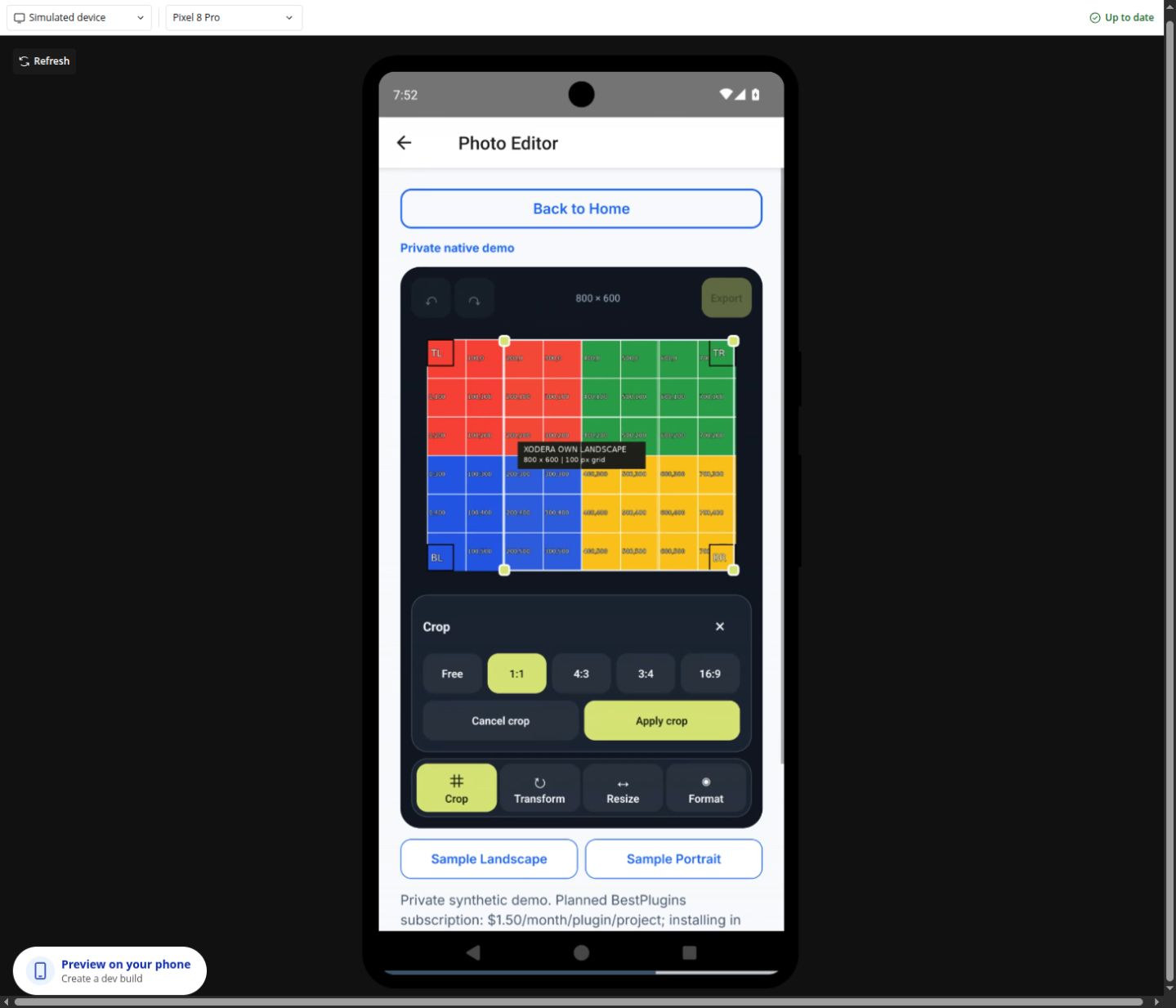
Це знімки нашого Android-симулятора, розміщеного в Bubble, із синтетичними прикладами. Відкрийте кожен у повному розмірі. Вони підтверджують показаний стан, а не перевірку на фізичному пристрої.
Відкрити повний знімок Відкрити повний знімок

 Відкрити повний знімок
 Відкрити повний знімок
 Відкрити повний знімок

SETUP / BUBBLE
Від елемента до вашого workflow
Для кожного демо наведено входи, команди, події Bubble та результати. Технічні назви залишено англійською, щоб ви знайшли точне поле в редакторі.
Налаштуйте один раз
Створіть або оберіть проєкт Bubble у BestPlugins → Dashboard → Plugins.
Оберіть цей плагін і скопіюйте ключ його проєкту.
У Bubble → Plugins → вибраний плагін вставте ключ у licensing_api_key для Audio, Video, Photo, Recorder або Offline Files; у project_api_key — для Documents AI, QR Passes або B2 Files. Якщо активацію позначено як заплановану, дочекайтеся її доступності.
Додайте елемент, оберіть дані свого застосунку та побудуйте workflow нижче.
Audio Player, Video Player, Photo Editor, Audio Recorder та Files Kit: безкоштовне встановлення в Bubble, потім 7 днів пробного доступу з карткою і 1,50 USD на місяць за плагін у проєкті. Development і Live включені. Без ліміту операцій; обмеження файлів і можливостей залишаються. Перед підтвердженням перевірте дату першого списання й умови скасування. Інші плагіни залишаються запланованими.
П’ять медіа- та файлових плагінів доступні в публічній бета-версії. Приватні демо Native Lab нижче мають окремі обмеження доступу й не активують підписку.
01 / Підготуйте нативний екран
Встановіть обрану публічну бета-версію у своєму нативному мобільному застосунку Bubble. Плагіни з позначкою «Заплановано» або «Приватна чернетка» залишаються недоступними. Цей посібник не надає доступу до приватних демо Native Lab.
Розмістіть зазначений елемент на нативному екрані. Задайте видимий розмір медіаелементам. Прив’яжіть динамічні поля до даних застосунку чи поля вводу; почніть із синтетичних файлів.
Прив’яжіть is_active до фокуса чи видимості екрана, якщо елемент має це поле. Використовуйте disabled для блокування взаємодії. Не додавайте ключі провайдерів чи приватні серверні ключі плагінів у нативні поля та URL.
Після зміни плагінів або нативних дозволів перебудуйте симулятор, якщо Bubble цього просить. Поки готується нова збірка, може працювати попередня.
02 / Оберіть потрібне прев’ю
У меню прев’ю Bubble оберіть Simulated device для запуску нативних бібліотек. Звичайне вебпрев’ю саме по собі не перевіряє ці нативні елементи.
Офіційне прев’ю розробника відкриває екран Home і потребує входу як наявний співавтор цього застосунку Bubble. Звичайного облікового запису Bubble недостатньо. Посилання не надає прав співавтора чи анонімного доступу до симулятора.
Спочатку спробуйте синтетичні приклади, потім власні дозволені файли. Камеру, дозволи, аудіовихід і поведінку пристрою потрібно окремо перевірити на справжньому Android або iPhone.
Це прев’ю лише для розробників: Bubble вимагає вхід як співавтор цього застосунку. Посібник і знімки відкриті без облікового запису. Анонімний інтерактивний симулятор очікує перевіреної публічної збірки.
Xodera Audio Player Native
Відтворення: бетаАудіо
Компактний нативний програвач голосових повідомлень, уроків та аудіовкладень.
Показано на Android
Динамічне джерело, позиція/швидкість і workflow Play/Seek показані у хмарному Android-симуляторі.
Ще потребує перевірки
Аудіовихід на пристрої й нові жести ще перевіряються. Запис не входить до функцій.
Спробуйте послідовно
Задайте source_url як доступний URL аудіо чи підтримуваний локальний файл. За потреби додайте title, subtitle та waveform_peaks_json.
Натисніть Play, змініть позицію та швидкість. Для хвильової форми явно надайте піки; автоматичного аналізу мовлення немає.
Прив’яжіть кнопки Bubble до Play, Pause або Seek. Передайте числову позицію в seconds для Seek, перевірте current_time та playback_rate.
Підключіть workflow Bubble
Обробіть ready перед увімкненням відтворення. Використовуйте seek_completed для завершення переміщення та player_error з error_code для безпечного повідомлення.
Прочитайте результат
Читайте player_status, current_time, duration, progress і playback_rate. Відтворення не створює новий аудіофайл.
Скидання або зупинка
Stop зупиняє відтворення; Reload source повторно відкриває джерело. Задайте is_active = no для неактивного екрана.
Динамічні вхідні поля10
source_urlwaveform_peaks_jsontitlesubtitleplayback_ratevolumeloopis_activedisabledui_text_jsonДоступні стани13
player_statusis_playingis_loadedis_bufferingcurrent_timedurationprogressplayback_ratevolumeis_loopingwaveform_availablewaveform_statuserror_codeПодії7
readyplayback_startedplayback_pausedplayback_endedseek_completedrate_changedplayer_errorДії елемента8
PlayPauseToggleStopSeek(seconds)Set speed(rate)Set volume(volume)Reload source
Назви взято з поточних визначень нативних елементів. Наявність дії не означає її перевірку на кожному пристрої. Розгорніть довідник, щоб побачити всі назви.
Native Video Player
Інтерфейс: бетаВідео
Нативне відтворення з накладеними кнопками, динамічними джерелами й workflows Bubble.
Показано на Android
Накладені кнопки, зміни джерела, позиція/швидкість, Pause через workflow і повний екран мають знімки Android-симулятора.
Ще потребує перевірки
Жести й останній кандидат коду ще перевіряються. Доступні доріжки залежать від поточного джерела; DASH — лише Android.
Спробуйте послідовно
Задайте source_url і за потреби poster_url. Залиште content_type = auto, якщо джерело не потребує progressive, hls або dash.
Натисніть Play у центрі. Використайте прогрес, швидкість, гучність/тишу та повний екран. Меню показує доступні параметри відтворення.
Прив’яжіть кнопку Bubble до Pause або Seek. Для Seek використайте position_seconds, для Set playback rate — rate. Нове джерело не гарантує автозапуску.
Підключіть workflow Bubble
Використовуйте source_loaded / playback_ready для готовності, time_changed для прогресу та player_error з error_code. Індекси доріжок стосуються лише поточного джерела.
Прочитайте результат
Читайте position_seconds, duration_seconds, rate, is_fullscreen і status. Це відтворення, а не експорт зміненого файлу.
Скидання або зупинка
Використайте Stop and rewind або Reload video. Задайте is_active = no при виході; для продовження потрібна явна дія.
Динамічні вхідні поля11
source_urlposter_urlcontent_typeratevolumemutedloopis_activedisablednative_controlsui_text_jsonДоступні стани20
is_playingis_bufferingpending_playis_livemutedloophas_sourceis_fullscreenposition_secondsduration_secondsvolumeratesource_generationselected_audio_indexselected_subtitle_indexstatusaudio_tracks_jsonsubtitle_tracks_jsonerror_codeerror_messageПодії9
source_changedsource_loadedplayback_readyplaying_changedtime_changedendedtracks_changedfullscreen_changedplayer_errorДії елемента11
PlayPauseStop and rewindReload videoSeek(position_seconds)Set volume(volume)Set muted(muted)Set playback rate(rate)Enter fullscreenSelect audio track(index)Select subtitle track(index)
Назви взято з поточних визначень нативних елементів. Наявність дії не означає її перевірку на кожному пристрої. Розгорніть довідник, щоб побачити всі назви.
Photo Editor
Редактор: бетаФото
Завантажте зображення, обріжте, поверніть, змініть розмір та експортуйте локальний результат.
Показано на Android
Рамка обрізання, поворот, зміна розміру та стани експорту PNG показані на Android-симуляторі.
Ще потребує перевірки
Жести, пікселі, орієнтація й метадані експортованих файлів ще перевіряються. Стан на екрані не підтверджує вміст файлу.
Спробуйте послідовно
Задайте source_url як URL зображення чи локальний URI, потім Load source. Налаштуйте crop_aspect і залиште show_controls увімкненим на час навчання.
Оберіть Begin crop, змініть виділення й Apply crop. Використайте Rotate чи Resize, потім Undo / Redo для перегляду історії.
Оберіть export_format (jpeg або png), export_quality та export_max_dimension, потім Export image. Дочекайтеся export_completed перед читанням результату.
Підключіть workflow Bubble
На source_loaded увімкніть редагування. На export_completed прочитайте output_uri та output_mime. Обробляйте editor_error з error_code й чекайте, поки is_busy = yes.
Прочитайте результат
output_uri — локальний кеш-файл із output_width, output_height, output_bytes та output_mime. Додайте власне авторизоване завантаження для збереження.
Скидання або зупинка
Cancel crop завершує режим обрізання. Reset edits повертає початкове джерело; Clear session очищує сесію та локальний стан результату.
Динамічні вхідні поля11
source_urldocument_contextis_activedisabledshow_controlscrop_aspectexport_formatexport_qualityexport_max_dimensionallow_upscaleui_text_jsonДоступні стани16
editor_statusis_busyhas_imagehas_changescan_undocan_redoimage_widthimage_heightoutput_urioutput_widthoutput_heightoutput_bytesoutput_mimeerror_codecrop_activecrop_rect_jsonПодії10
source_loadedsource_load_failededit_appliededit_undoneedit_redoneeditor_resetexport_startedexport_completedoperation_cancellededitor_errorДії елемента13
Load sourceBegin cropApply crop(origin_x,origin_y,width,height)Cancel cropRotate(degrees)Flip(axis)Resize(width,height)UndoRedoReset editsExport imageCancel operationClear session
Назви взято з поточних визначень нативних елементів. Наявність дії не означає її перевірку на кожному пристрої. Розгорніть довідник, щоб побачити всі назви.
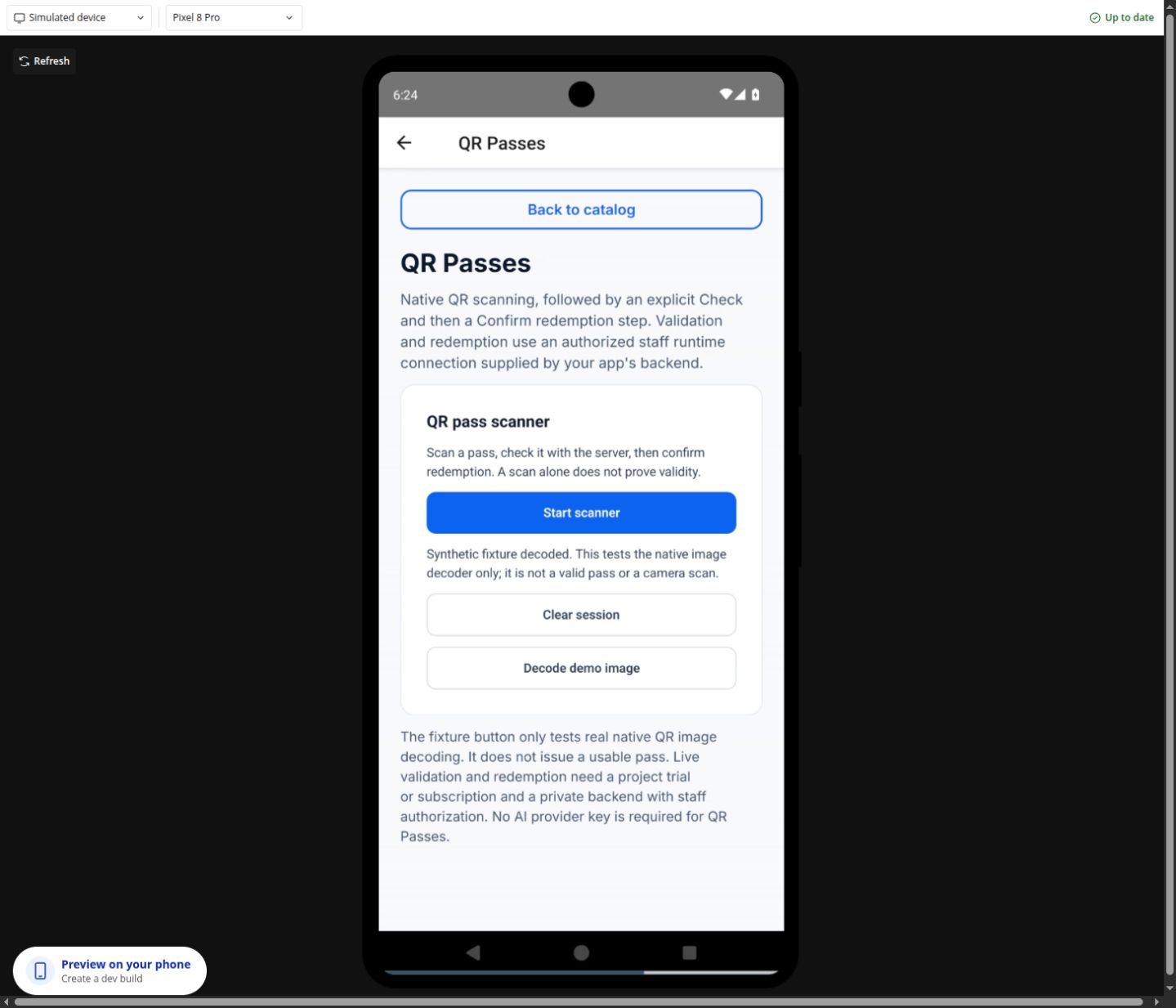
QR Pass Scanner
Сканер: бетаQR-перепустки
Нативний сканер та окремий авторизований серверний сценарій перевірки й погашення.
Показано на Android
Відмова/повтор дозволу, запуск/пауза камери й нативне декодування публічного синтетичного QR мають докази Android.
Ще потребує перевірки
Зображення хмарної камери може бути чорним. Фізичний скан, живі перевірка/погашення й нативна Clear session ще не прийняті.
Спробуйте послідовно
Для безпечного демо задайте demo_enabled = yes і Decode demo image. fixture_decoded підтверджує тільки декодування; перепустка не створюється й не перевіряється.
Для живого сканування надайте дозвіл камері й запустіть сканер. Прив’яжіть is_active до фокуса екрана, щоб приховані екрани зупиняли камеру.
Приватно налаштуйте серверний ключ QR та надайте працівникам права у backend. Коли готові дії стануть доступними, спочатку скануйте, потім окремо Check / Redeem. Приймання живого сценарію працівників ще очікується.
Підключіть workflow Bubble
Використовуйте fixture_decoded для прикладу, pass_scanned для скану. Лише успішна квитанція pass_redeemed підтверджує погашення. Працівнику потрібне право qr_passes:redeem. На redemption_pending збережіть сесію та Retry same redemption.
Прочитайте результат
Читайте scanner_status, server_status, scan_source і безпечний receipt_id після власного успішного погашення. Секрет QR та runtime-дозволи не публікуються як стани Bubble.
Скидання або зупинка
Pause зупиняє камеру. Clear session очищує локальний стан; уже надісланий серверний запит може завершитись. Офлайн-погашення немає.
Динамічні вхідні поля4
disabledis_activedemo_enabledui_text_jsonДоступні стани11
scanner_statusserver_statuspass_idpass_labelreceipt_iderror_codeis_busyis_scanningtorch_enabledscan_sourcepending_redemptionПодії13
scanner_startedscanner_pausedscanner_cancelledpermission_deniedpass_scannedvalidation_startedvalidation_completedredemption_startedpass_redeemedredemption_rejectedredemption_pendingfixture_decodedqr_errorДії елемента1
Clear session
Назви взято з поточних визначень нативних елементів. Наявність дії не означає її перевірку на кожному пристрої. Розгорніть довідник, щоб побачити всі назви.
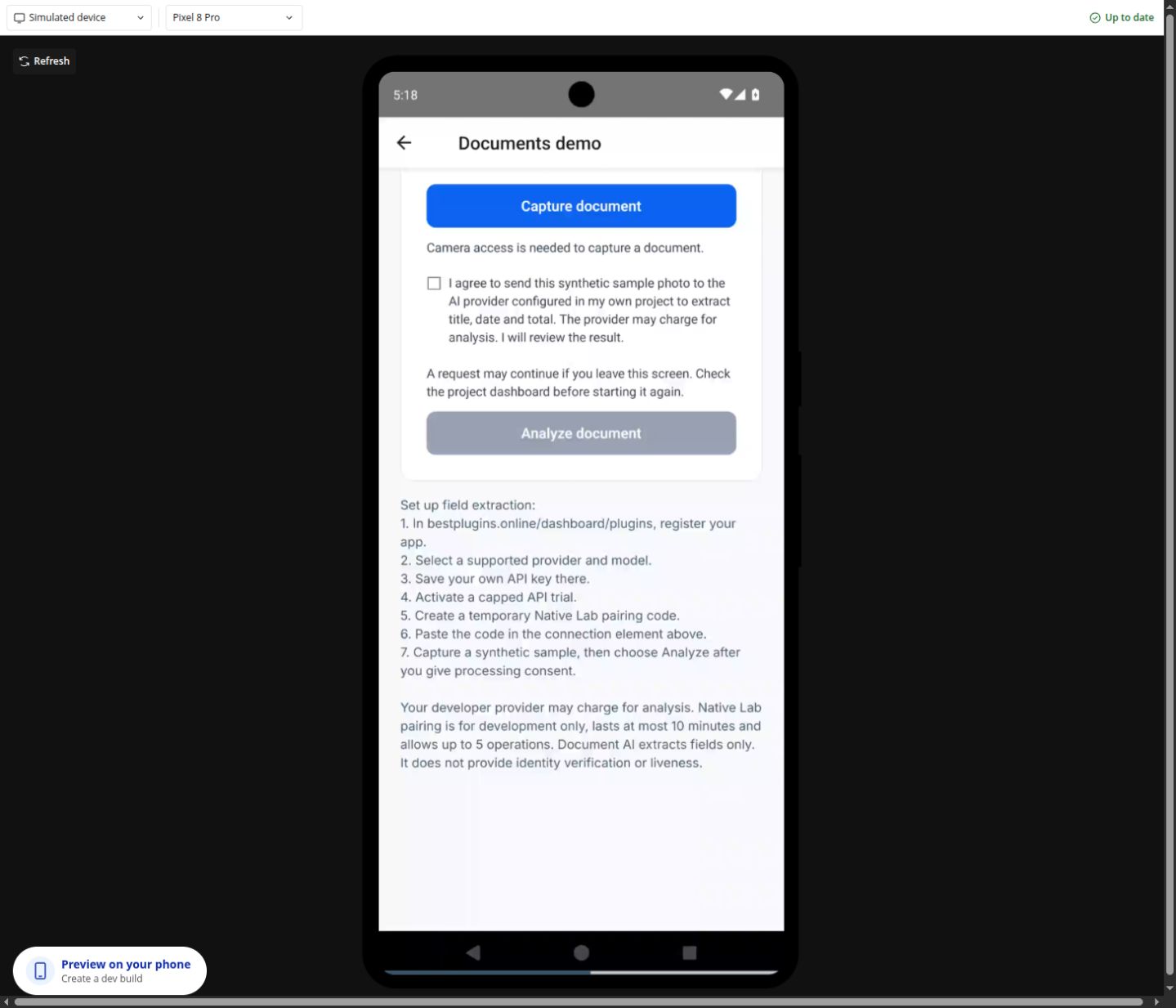
Document Capture
Зйомка / AI: бетаДокументи
Зйомка за згодою та необов’язкове розпізнавання через вашого AI-провайдера.
Показано на Android
Попередня нативна зйомка та поточна відмова дозволу мають докази хмарного Android. Знімок показує саме відмову дозволу.
Ще потребує перевірки
Наскрізне розпізнавання поточним нативним компонентом і провайдером ще очікується. Це не перевірка особи, справжності чи присутності.
Спробуйте послідовно
Задайте document_side, button_label та consent_text. Використайте синтетичний чек, надайте згоду на зйомку й Capture document.
Для AI у цьому приватному Lab налаштуйте провайдера й тимчасове з’єднання нижче. Задайте fields_json. Заплановане налаштування вашого застосунку використовує приватний ключ плагіна Document AI у захищеному backend.
Прочитайте окрему згоду на обробку, потім Analyze document. Для відомої операції в очікуванні використайте Check result і перевірте отримані поля.
Підключіть workflow Bubble
На capture_succeeded прочитайте local_uri. Для permission_denied надайте можливість повтору. На analysis_ready покажіть analysis_fields_json для перевірки; analysis_pending означає перевірку тієї самої операції.
Прочитайте результат
local_uri — зображення кешу пристрою. analysis_fields_json містить розпізнані поля, review_required залишається true. Ключам провайдера немає місця в нативному елементі.
Скидання або зупинка
Нова явна зйомка починає інший документ. Після завершення відкличте з’єднання; зміна автентифікованого runtime-контексту очищує попередню приватну роботу.
Динамічні вхідні поля8
document_sidebutton_labelconsent_textdisabledfields_jsonprocessing_consent_textanalyze_button_labelcheck_button_labelДоступні стани14
capture_statuslocal_urimime_typedocument_sideimage_widthimage_heighterror_codeis_capturinganalysis_statusanalysis_operation_idanalysis_fields_jsonanalysis_error_codereview_requiredis_analyzingПодії9
capture_startedcapture_succeededcapture_cancelledpermission_deniedcapture_erroranalysis_startedanalysis_readyanalysis_pendinganalysis_errorДії елемента0
Елемент використовує власні нативні кнопки та доступні події; додаткових дій workflow не оголошено.
Назви взято з поточних визначень нативних елементів. Наявність дії не означає її перевірку на кожному пристрої. Розгорніть довідник, щоб побачити всі назви.
DATA / WORKFLOWS01 02 03
Динамічні значення на практиці
Змініть медіаджерело
Прив’яжіть source_url Xodera Audio Player Native або Native Video Player до URL файлу Bubble чи підтримуваного локального URI. Нове значення замінює джерело; запускайте відтворення явно. Для Seek аудіо використовує seconds, а відео — position_seconds.
Використайте результат фото
Задайте source_url Photo Editor, оберіть export_format та export_quality, потім виконайте Export image. На export_completed прочитайте output_uri, output_mime та розміри. URI вказує на кеш пристрою, а не публічне завантаження Bubble.
Додайте розпізнані дані
Задайте fields_json Document Capture як ["title","date","total"]. Налаштуйте ключ Document AI у захищеному backend і використовуйте Analyze document, коли готова дія стане доступною. У цьому приватному Lab використовуйте окреме з’єднання нижче. На analysis_ready перевірте analysis_fields_json та залиште review_required видимим.
Локальні файли залишаються локальними до вашого рішення
output_uri Photo Editor та local_uri Document Capture вказують на тимчасові файли пристрою. Прев’ю може зникнути після очищення сесії чи кешу. Щоб зберегти результат, додайте у своєму застосунку авторизоване завантаження або сховище. Демо не публікує, не завантажує до Bubble, не зберігає в галерею автоматично та не створює змонтоване відео.
APPS / WORKFLOWS
What you can build
Concrete examples connect dynamic inputs, plugin actions and results in your app. Availability follows each product’s current release status.
What you can build
Xodera Audio Player Native
Voice notes inside a support conversationA plain file link sends users away from the conversation and makes long replies hard to review.See the workflow
- Dynamic input
source_url = Selected Message’s audio URL;title = Selected Message’s sender label;subtitle = Selected Message’s timestamp.- Business workflow
- Place the player in the selected-message detail. Let the user Play/Pause, Seek to a useful point and Set speed. Bind
is_activeto the open conversation. - Result
- Use
is_playing,current_timeanddurationto show progress. Keep the Message ID in your app so a late event cannot update a different conversation. - Failure and recovery
- On
player_error, showerror_codeand offer Reload source; preserve the message and never mark it listened to after an error. - Scope
- Playback only. It does not send messages, transcribe or create waveform data.
Resume a language lesson at the saved positionLearners need to replay a difficult passage instead of restarting the whole lesson.See the workflow
- Dynamic input
source_url = Current Lesson’s audio URL;title = Current Lesson’s name; the last position belongs to that learner and lesson in your database.- Business workflow
- After
readyfor the current lesson, Seek to the saved seconds and wait for the user to Play. Use Set speed for slower listening. Save progress with your own app workflow. - Result
- Read
current_timeandduration. Onplayback_ended, your app may record a listening milestone for the current Lesson. - Failure and recovery
- If the source changed, discard the old position until that lesson is loaded. Do not treat listening completion as proof that the learner understood or passed a test.
- Scope
- Progress storage is your Bubble workflow. Playback ends and resumes only within the accepted foreground runtime; no background or lock-screen promise.
Review an audio attachment with timestamped commentsEditors or trainers need to jump from a comment to the relevant moment in a recording.See the workflow
- Dynamic input
source_url = Selected Review’s recording URL; each app-owned Comment stores its own seconds value; optionalwaveform_peaks_jsoncontains real peaks for that same recording.- Business workflow
- Click a Comment → Seek to its seconds → Play. On source change, replace or clear the peaks and bind the selected Review again.
- Result
- Display
current_timebeside your comment composer.waveform_availabletells your UI whether actual supplied peaks are available. - Failure and recovery
- Clamp or reject stale timestamps against the current duration in your app. When no real peaks exist, show the ordinary progress control rather than invented audio analysis.
- Scope
- Comment storage, transcription, waveform generation and audio editing are outside this player.
Playback only; waveform peaks must be supplied for the same file. Native device verification remains pending.
What you can build
Xodera Audio Recorder Native
Listen before sending a non-confidential voice messageUsers need a chance to hear and replace a recording before it becomes an attachment.See the workflow
- Dynamic input
title = the app’s conversation label; setmax_duration_secondsandmax_upload_bytesto your message policy.- Business workflow
- Start recording → Stop recording → wait for
recording_ready→ Play preview. Offer Seek preview and Set preview speed. Only an explicit Send invokes Upload to Bubble on the accepted own-app upload endpoint. - Result
- Only on
upload_succeeded, create your Message and set its audio field touploaded_file. The message is not created by the recorder itself. - Failure and recovery
- On microphone denial show
permission_status; on upload failure keep the local recording. Reconcile an unknown upload before retrying so Send cannot create duplicate attachments/messages. - Scope
- The current typed Bubble upload is public-only. Do not use this scenario for confidential support, medical or identity recordings. No automatic transcription or encrypted chat is included.
Pronunciation practice without an immediate uploadLearners want to compare their own spoken response with a lesson before deciding to submit it.See the workflow
- Dynamic input
title = Current Exercise’s prompt;max_duration_seconds = the exercise limit; an exercise answer remains an app-owned record.- Business workflow
- Record → Stop → Play preview. Let the learner seek, slow the preview or cancel and record another attempt. Save locally only when they choose to keep the draft.
- Result
duration,local_uri,mime_typeanddraft_iddescribe the attempt. Your app decides whether it remains local or is later submitted through an appropriate accepted transport.- Failure and recovery
- On
preview_error, preserve the draft and showerror_code. Do not turn a preview or saved draft into a submitted Answer until the app’s submission workflow succeeds. - Scope
- No pronunciation scoring, transcription, teacher notification or automatic submission. Process-restart restoration still needs native acceptance.
Keep a local voice draft and make Send explicitA field worker can be interrupted before finishing a note and should not have to upload it just to keep it.See the workflow
- Dynamic input
saved_draft_id = the draft ID stored by your app for this device and account;title = the selected non-sensitive task label.- Business workflow
- Start/Stop recording → Save locally. Store the returned
draft_idin your own device/account-scoped state. Use Restore local draft for that same ID, then Play preview before deciding whether to upload. - Result
- On
local_savedorlocal_restored, inspectis_saved_locally,local_uriandduration. Only delete the saved draft after explicit user choice or after a separately confirmed retention policy. - Failure and recovery
- If restore fails, show
error_codeand keep the ID for diagnosis; do not report an empty or different recording as restored. Never auto-upload on reconnect. - Scope
- A draft ID is not a cloud URL and does not move between devices. Account isolation and close/reopen durability need actual native acceptance before this scenario is marketed as available.
The current typed Bubble upload is public-only. Audible native playback and close/reopen draft durability still require acceptance.
What you can build
Xodera B2 Files Native
Store a job attachment in the developer’s own private bucketA Bubble Job needs a durable storage reference without treating an expiring download URL as the file identity.See the workflow
- Dynamic input
bucket_binding_id = an allowed binding to your own private bucket; dynamiclocal_uri,display_name,mime_typeandexpected_sizedescribe the selected local file.- Business workflow
- Candidate transfer flow: Check local source → Upload file → wait for
upload_verified. Your workflow then storesasset_refand metadata on the owned Job record. - Result
- Use
asset_ref,size_bytes,mime_typeandupload_status. Later, Resolve private read can provide a temporary URL for an authorized use. - Failure and recovery
- If database save fails after
upload_verified, retry the DB update with the same asset reference rather than another PUT. Reconcileupload_pendingusing Check or recover upload status and the same upload ID. - Scope
- The own-account transfer source is implemented but its automatic one-key bridge, actual native installation and B2-byte acceptance remain pending. A private bucket does not automatically implement your app’s Job permissions.
Build an owned attachment gallery with durable file recordsA file gallery needs names, types and pagination as well as a way to open the selected asset later.See the workflow
- Dynamic input
- Your app’s File record stores an accepted
asset_ref, display name, MIME and owner/job relation after a verified upload; do not use a local URI as its cloud identity. - Business workflow
- Candidate transfer source can List application files and Load more application files. For Bubble repeating lists, use separately accepted typed server reads or your own synchronized File Things; selecting a record supplies its
asset_refto Get asset metadata or Download accepted version. - Result
has_moreandnext_cursorbelong to the current query. A completed download returnslocal_output_uri; it is a device-local copy, not a permanent public link.- Failure and recovery
- Reset pagination after binding/account/query changes. On
transfer_error, preserve the existing File Thing and showerror_code; do not silently replace it with another provider version. - Scope
files_jsonis diagnostic, not proof of typed Bubble RG integration. No live bucket/native/gallery acceptance, cloud sync or resumable/background download is claimed.
Make publication and exact-version deletion deliberateStaff should not accidentally expose a private attachment or delete every version when replacing an image.See the workflow
- Dynamic input
asset_ref = the selected accepted version; bucket binding and the app’s server-side ownership/policy must allow the requested operation.- Business workflow
- Show the current visibility, ask for explicit confirmation, then Change public sharing. For removal, call Delete accepted version with confirmation; keep app metadata until the confirmed outcome is known.
- Result
- After
share_changed, consumevisibilityandpublic_urlonly when public sharing was explicitly authorized. Afterdelete_completed, update the owned File record;delete_pendingis not final deletion. - Failure and recovery
- Reconcile an uncertain operation instead of assuming success. Previously issued provider read URLs may remain valid until expiry; removing a DB row or disabling sharing does not recall bytes already downloaded.
- Scope
- No bucket-policy mutation, purge-all or single-use/revocable URL guarantee. Public-bucket bytes may already be exposed during upload; use a private bucket when secrecy is required. All scenarios remain draft until provider/native acceptance.
Your own buckets and restricted credentials. The automatic one-key native bridge, actual plugin installation and provider-byte acceptance are pending.
What you can build
Xodera Documents AI Native
Prefill an expense draft from a receipt photoRepeated typing of merchant, date and total slows expense entry; extracted fields can be a reviewable draft.See the workflow
- Dynamic input
fields_json = ["merchant","date","total","currency"]; the user captures a receipt image and separately consents to processing. Use only synthetic receipts during integration acceptance.- Business workflow
- Candidate business flow:
analysis_requested→ Analyze Captured Document using the bounded exported bytes/MIME/field names/consent/request ID → show returned fields in your editable Expense form. - Result
- The action returns
status,operation_id,fields_jsonandreview_required. Your user corrects/approves the fields before your workflow creates an Expense. - Failure and recovery
- On an uncertain result, Read Analysis with the same
operation_id; do not issue another analysis automatically. Consent withdrawal clears retained capture/export; never persist raw base64 in a public Thing or logs. - Scope
- This is a source-reviewed candidate: native bytes→authenticated backend→real provider acceptance is pending. No accounting approval, guaranteed numeric accuracy, PDF processing or authenticity verdict.
Read a delivery-note reference for a staff review formA warehouse user should be able to review a suggested reference/date instead of typing it from a photographed paper slip.See the workflow
- Dynamic input
fields_json = ["delivery_reference","supplier","delivery_date"]; capture the relevant side of a synthetic delivery note during QA.- Business workflow
- After separate capture/processing consent, Analyze Captured Document proposes the selected fields. Show the photograph beside editable fields and ask staff to confirm the matching Delivery record.
- Result
- Keep the returned
operation_idfor reconciliation andfields_jsonas a proposal. Your workflow performs the actual Delivery lookup/update only after staff review. - Failure and recovery
- Missing, ambiguous or incorrect fields require manual correction. A provider error leaves the original Delivery unchanged; Read Analysis reconciles an uncertain operation.
- Scope
- No automatic inventory movement, signature validation, proof of delivery or arbitrary model guarantee. The one-key business transport is not yet native/provider accepted.
Suggest an equipment serial number from a label photoA maintenance form can offer a reviewable model/serial suggestion when an asset label is awkward to type.See the workflow
- Dynamic input
fields_json = ["manufacturer","model","serial_number"]; capture a synthetic equipment-label image; configure an available DeepInfra or OpenAI preset and your own provider key privately in BestPlugins.- Business workflow
- The candidate Analyze Captured Document business action returns proposed strings. Display them next to the photo; let the user correct them before your Asset lookup or maintenance workflow.
- Result
- Use returned
fields_json,review_requiredandoperation_id. Treat identifiers as text so your app preserves leading zeros. - Failure and recovery
- If the image is unreadable or the model proposes a wrong string, allow manual entry. Read the same operation after an uncertain response rather than charging another inference.
- Scope
- Extraction does not prove ownership, equipment authenticity or identity. Model presets are curated; there is no arbitrary endpoint/model input or accepted native extraction claim.
Field suggestions require human review. Authenticated native byte transport and a positive real-provider result are pending; no identity verification.
What you can build
Xodera Offline Files Native
Stage several local attachments before submitting a reportA form needs to show which files were picked and let the user keep a managed copy before any cloud submission.See the workflow
- Dynamic input
accepted_mime_types_json = your allowed MIME list;multiple = yes; setmax_files,max_file_bytesand an account/reportdocument_context.- Business workflow
- Pick files → inspect the selected names/sizes → Save selection locally. Your form keeps the resulting file IDs until its separate Submit workflow uploads approved files.
- Result
- Use
selection_count,file_names,file_sizesandsaved_file_idsto render the review list. A saved managed copy preserves the caller’s original. - Failure and recovery
- A cancelled picker is not a submitted report. On
files_error, keep already accepted local IDs and showerror_code; never create a cloud attachment from a local URI alone. - Scope
- No automatic cloud sync or upload. MIME labels are filters, not malware or content validation. Native picker/copy behavior still needs target-OS acceptance.
Keep a photo-editor or recorder output for later useA generated local file may live in a temporary location; the app needs an explicit managed copy.See the workflow
- Dynamic input
source_uri = the local output of a separately accepted editor/recorder; bind its realdisplay_nameandmime_type; use the same owner’sdocument_context.- Business workflow
- Load local source → inspect metadata → Save selection locally. Store the returned file ID only in the matching device/context, then Restore saved file by that exact ID when needed.
- Result
- Consume
file_id,local_uri,size_bytesandis_saved_locally; usefile_restoredto distinguish a completed restore from merely requesting one. - Failure and recovery
- Reject a remote HTTP URL as a local source. If a source vanished or restoration fails, show
error_codeand preserve the original app record for recovery. - Scope
- No server can read this URI directly. Files does not prove another plugin’s export correctness, cloud durability or process-restart durability.
Let a user share an app-generated local receipt or exportThe app should hand a selected local file to the device share sheet rather than inventing a public URL.See the workflow
- Dynamic input
selected_file_id = the exact managed copy chosen from your app’s saved-file list; its name and MIME describe the real local file.- Business workflow
- List saved files → Restore saved file → Share selected file after the user taps Share. Keep the saved copy until they explicitly choose Delete saved copy.
- Result
- Use
share_statusandshare_sheet_closedto update the UI after the sheet closes. Retain the file ID for another deliberate share. - Failure and recovery
- A closed share sheet is not proof that an email/message was delivered. Handle cancellation and
files_errorwithout reporting success to the recipient. - Scope
- Sharing goes through the OS. Files does not create a remote download URL or guarantee that a receiving app accepted the bytes.
Local files and OS sharing only; no automatic cloud sync. Native picker, copy, restore and receiving-app acceptance are pending.
What you can build
Xodera Photo Editor Native
Consistent profile avatars before uploadUsers should choose which part of their photo appears in a square profile image instead of accepting an arbitrary crop.See the workflow
- Dynamic input
source_url = selected profile image;crop_aspect = "1:1";document_context = an opaque account-specific namespace.- Business workflow
- Wait for
source_loaded; Begin crop → Apply crop, with Rotate or Undo as needed. On explicit Save, Export image. - Result
- Only on
export_completed, useoutput_uri,output_width,output_heightandoutput_mimeas inputs to your accepted upload workflow. Save its durable reference to the Profile afterward. - Failure and recovery
- If the user cancels or
editor_errorfires, keep the old avatar. Clear the session on account change so another user cannot see the draft. - Scope
- Export is local. Cloud upload and database updates are separate business actions; exact native gesture/export acceptance is still required.
Prepare consistent marketplace or catalogue photosDifferent framing and oversized images make a catalogue uneven and increase upload size.See the workflow
- Dynamic input
source_url = selected item photo;crop_aspect = the app’s chosen ratio;export_max_dimension,export_formatandexport_qualitycome from your upload policy.- Business workflow
- Crop the relevant area, optionally Resize, then Export image after the user confirms. Keep the original file/reference separately.
- Result
- Check
output_width,output_height,output_bytesandoutput_mimebefore your transport uploads the result. Store the resulting image reference on the Item. - Failure and recovery
- If export fails or the result violates your upload policy, show
error_codeand let the user revise it. Do not overwrite the previous Item image before upload confirmation. - Scope
- Resizing/quality settings do not promise an exact byte size or universal compression ratio. No background removal, filters or retouching is included.
Create a focused image copy for a field reportA technician may need a close-up of one damaged part while preserving the original report image.See the workflow
- Dynamic input
source_url = Current Report Photo’s source;document_context = opaque report/account namespace; crop ratio can remain unconstrained.- Business workflow
- Begin crop → Apply crop, then use Undo/Redo to compare edits. Export image creates the candidate copy; your app asks whether to attach that copy to the Report.
- Result
- Use
has_changes,can_undo,can_redoandoutput_uri. Store original and edited references in separate app fields after an accepted upload. - Failure and recovery
- Cancel crop or Reset edits restores the editing path; cancellation must leave the original Report attachment unchanged.
- Scope
- This is an edited copy, not forensic evidence preservation, annotation markup or authenticity verification. Do not claim EXIF retention without its own accepted test.
Export creates a local file. Upload and database persistence are separate business actions; native gestures/output still require acceptance.
What you can build
Xodera QR Passes Native
One-use admission for a same-day eventA screenshot of an ordinary QR value can otherwise be reused at more than one entrance.See the workflow
- Dynamic input
- Your app stores an Admission record and a stable issue
request_id; use curatedlabel=eventand attl_secondswithin the 1–86400-second contract. - Business workflow
- An authorized issuer runs Issue QR pass and privately delivers the returned QR. Staff scan → Check QR pass → confirm only if
ok=yesandstatus=available→ Confirm QR redemption with a stored stable request ID. - Result
- Only
status=redeemedplusreceipt_idauthorizes your app’s admission receipt. Store the pass/receipt reference on the Admission; do not expose bearer tokens to analytics. - Failure and recovery
- For
outcome_unknown, recover the same request with identical user/environment/pass; never generate a new confirmation ID. Handle expired, revoked and already-used states as distinct outcomes. - Scope
- No identity proof, offline redemption or permanent event ticketing. The current camera/scan→server business flow is not native-accepted; it is a release scenario, not an available demo.
Redeem a short-lived benefit once at a partner counterA partner needs a server-confirmed used/unused result instead of trusting a QR image or a screen animation.See the workflow
- Dynamic input
label=coupon; the app’s Benefit record defines eligibility and a short validity window before an authorized issue action.- Business workflow
- Issue a pass only after your app’s eligibility check. At the counter, Check QR pass shows availability without consuming it. After the staff member confirms delivery of the benefit, run Confirm QR redemption.
- Result
- Your Benefit record may store
receipt_idand the confirmed redemption time afterstatus=redeemed. The plugin manages pass state; your app manages the benefit and customer relationship. - Failure and recovery
- If a benefit is cancelled before use, the same authorized issuer can Revoke QR pass using its
pass_id. Do not announce a refund or successful redemption fromok=yesalone. - Scope
- No payment, POS settlement, discount calculation or person matching. A pass expires within the supported maximum of 24 hours; it is not a renewable membership card.
Confirm a same-day equipment or order pickupA staff workflow needs to distinguish scanning a collection reference from actually handing over an item.See the workflow
- Dynamic input
- Your app’s owned Collection record keeps authorization, the intended item and separate stable issue/redemption request IDs; use a short-lived
label=accesspass. - Business workflow
- After your app authorizes collection, Issue QR pass. Staff scan and Check, inspect the matching Collection in your app, then explicitly confirm the handover and Confirm QR redemption.
- Result
- Only after a confirmed
redeemedreceipt should your workflow set the Collection to handed over. Keepreceipt_idas the link to the pass outcome. - Failure and recovery
- A repeated scan may return already_used; display the existing app record instead of handing over another item. Recover an uncertain confirmation with the same ID and inputs.
- Scope
- The QR is a bearer capability, not proof of the holder’s identity or a full inventory system. Physical handover and app-record consistency remain your business process.
Own one-use passes, valid for at most 24 hours. Trusted native scan → Check → explicit Confirm acceptance is pending.
What you can build
Xodera Video Player Native
Chapter links in a training appA learner needs to replay one step of a demonstration without navigating to an external player.See the workflow
- Dynamic input
source_url = Current Lesson’s video URL;poster_url = Current Lesson’s cover; each Chapter stores an app-owned start time.- Business workflow
- Chapter click → if changing source, wait for
source_loaded→ Seek toposition_seconds→ Play. Use Set playback rate for a detailed demonstration and Enter fullscreen when requested. - Result
- Read
position_seconds,duration_secondsandis_fullscreen; your workflow stores lesson progress only for the current source. - Failure and recovery
- On
player_error, showerror_code, preserve progress and offer Reload video. A completion event is not proof that a lesson or safety assessment was passed. - Scope
- Publish only file/codec/OS combinations actually accepted. This is a player, not a video editor or DRM learning platform.
Video demonstrations on marketplace listingsA product image alone cannot explain how an item works, but an off-site video breaks the purchase flow.See the workflow
- Dynamic input
source_url = Selected Listing’s demonstration URL;poster_url = its thumbnail;muted = yesfor an intentionally silent first preview.- Business workflow
- Open the selected Listing → bind its video → Play after a user action. Offer Set muted for sound and Enter fullscreen for closer inspection. Bind
is_activeto the visible detail. - Result
- Use
has_source,is_bufferingandstatusto distinguish an absent video, loading and ready media. - Failure and recovery
- On source replacement, stop applying old progress and track selections. Show a thumbnail fallback when the selected file is unsupported.
- Scope
- This does not generate a video, accept every format or guarantee autoplay. Native portrait/landscape and fullscreen behavior remain release-specific acceptance gates.
Choose available language tracks in a supported streamA multilingual app needs to offer the tracks that a particular source actually contains.See the workflow
- Dynamic input
source_url = Selected Programme’s accepted stream URL; the source itself must provide compatible audio/subtitle tracks.- Business workflow
- On
tracks_changed, read the currentaudio_tracks_jsonandsubtitle_tracks_json; build choices in your app and call Select audio track or Select subtitle track with the current index. - Result
- Use
selected_audio_index,selected_subtitle_indexandsource_generationto associate the choice with this source. - Failure and recovery
- Rebuild the choices after every source change. If a track is absent or unsupported, keep the default track and show that availability honestly.
- Scope
- The player does not translate, generate captions or turn an arbitrary file into a multitrack stream. HLS/DASH/track support must have its own OS/source evidence.
File, stream and track support depends on the accepted source/OS combination. No editing, DRM or background playback.
DOCUMENT AI / BYOK
Підключіть Document AI із власним ключем провайдера
Провайдер налаштовується в кабінеті BestPlugins. Тимчасове з’єднання Native Lab дає змогу спробувати налаштований проєкт без передавання ключа провайдера в демо. Використовуйте синтетичні документи й перевіряйте кожен результат.
Налаштувати застосунокbestplugins.online/dashboard/plugins
Відкрийте Налаштувати застосунок, увійдіть, оберіть New app project, введіть ID застосунку Bubble чи посилання редактора й відкрийте проєкт.
Оберіть Document AI та Development. Виберіть запропоновані кабінетом провайдер і модель, збережіть власний ключ та натисніть Use provider, якщо цей вибір показано. Ключі провайдера й приватний ключ плагіна Document AI залишаються в BestPlugins або вашому захищеному backend.
За наявності права оберіть «Почати пробний період API». Пробний період Document AI / QR API триває сім днів без обмеження кількості операцій і охоплює розробку та продакшн. Послуги провайдера оплачуються окремо; це не активує платний нативний реліз.
У Connect Native Lab прочитайте згоду на тимчасовий сеанс й оберіть Create pairing code. Введіть одноразовий код у Native Lab. Він діє десять хвилин без окремого обмеження кількості операцій; платний доступ також не має обмеження кількості операцій за підпискою. Не вставляйте код у URL.
Саме з’єднання не обробляє документ. Зніміть або оберіть синтетичний приклад, окремо погодьте обробку провайдером, потім натисніть Analyze. Для операції в очікуванні використовуйте Check result без повторного надсилання.
Перевірте отримані поля та відкличте з’єднання в BestPlugins після завершення. Погашення QR-перепусток працівниками потребує окремого дозволу захищеного backend; з’єднання Document AI його не надає.
BETA / PRICING
Тариф публічної бета-версії
За плагін і проєкт застосунку Bubble. Розробка та production включені для цього проєкту. Власний AI-провайдер окремо тарифікує використання.
7 днів з карткою, потім 1,50 USD / місяць
Безкоштовне встановлення в Bubble
Активуйте Audio Player, Video Player, Photo Editor, Audio Recorder або Files Kit у його проєкті на панелі керування. Перед підтвердженням перевірте умови пробного доступу з карткою та щомісячну ціну. Інші плагіни недоступні для покупки; приватні демо мають окремі обмеження.STATUS / LIMITS
Що показує бета і що ще треба перевірити
- Кнопки аудіо/відео, стани редагування/експорту фото та декодування синтетичного QR мають докази з Android-симулятора. Це не підтверджує кожен формат, експортований файл, пристрій або workflow.
- Удосконалення жестів проходять перевірку. Фізичні Android, iPhone, зйомка камерою, аудіовихід і доступність потребують окремого приймання.
- Налаштування відео змінюють лише відтворення. Не заявляємо експорт відеомонтажу, запис, перевірку присутності, порівняння облич чи підтвердження особи.
- Зйомка документів і необов’язкове AI-розпізнавання потребують окремих згод. Розпізнавання може помилятися та завжди потребує перевірки людиною. Поточний нативний AI-сценарій ще перевіряється.
- Відкритий посібник доступний зараз. Анонімний інтерактивний нативний симулятор очікує перевіреної публічної збірки й тесту доступу без входу.
Продовжуйте роботу
Усі категорії плагінівКатегорія нативних мобільних функційНалаштувати застосунок · потрібен вхідДопомога з власною інтеграцієюДокументація мобільних прев’ю Bubble
Відкрити прев’ю розробникаЦе прев’ю лише для розробників: Bubble вимагає вхід як співавтор цього застосунку. Посібник і знімки відкриті без облікового запису. Анонімний інтерактивний симулятор очікує перевіреної публічної збірки.