Xodera Plugins · Bubble Native
Xodera Photo Editor Native
将选定的照片转换为统一的头像、产品图片或报告附件。裁剪、旋转并调整大小,然后在应用中保存导出的副本。
Public beta guides · Haptics instructions are in its Bubble listing
Public beta offer: free Bubble install · 7-day card trial, then US$1.50/month per plugin/project.
文档审阅日期:2026年11月6日
实用示例
上传前保持一致的个人头像
用户应选择照片的哪一部分显示在方形个人头像中,而不是接受任意裁剪。
`source_url = selected profile image`; `crop_aspect = "1:1"`; `document_context = the account’s stable reference`.
等待 `source_loaded`;Begin crop → Apply crop,必要时使用 Rotate 或 Undo。用户明确点击 Save 时,执行 Export image。
仅在 `export_completed` 时,使用 `output_uri`、`output_width`、`output_height` 和 `output_mime` 作为文件上传工作流的输入。随后将其持久引用保存到个人资料中。
如果用户取消或 `editor_error` 触发,保留旧头像。账户切换时清除会话,以防其他用户看到草稿。
编辑会创建本地副本。您的应用决定如何保存或上传它。
准备一致的市场或目录照片
不同的构图和超大图像会导致目录不整齐并增加上传大小。
`source_url = selected item photo`;`crop_aspect = the app’s chosen ratio`;`export_max_dimension`、`export_format` 和 `export_quality` 来自您的上传策略。
裁剪相关区域,可选地 Resize,然后在用户确认后 Export image。将原始文件/引用单独保留。
在上传工作流保存结果之前,检查 `output_width`、`output_height`、`output_bytes` 和 `output_mime`。将生成的图像引用存储在项目上。
如果导出失败或结果违反您的上传策略,显示 `error_code` 并让用户修改。在上传确认之前不要覆盖之前的项目图像。
编辑会创建本地副本。您的应用决定如何保存或上传它。
为现场报告创建聚焦图像副本
技术人员可能需要对受损部位进行特写,同时保留原始报告图像。
`source_url = Current Report Photo’s source`;`document_context = the report/account reference`;裁剪比例可以保持不受约束。
Begin crop → Apply crop,然后使用 Undo/Redo 比较编辑。Export image 创建编辑后的副本;您的应用询问是否将该副本附加到报告中。
使用 `has_changes`、`can_undo`、`can_redo` 和 `output_uri`。成功上传后,将原始和编辑后的引用分别存储在应用的不同字段中。
Cancel crop 或 Reset edits 恢复编辑路径;取消操作必须保持原始报告附件不变。
编辑会创建本地副本。您的应用决定如何保存或上传它。
当前可用功能
Public beta. Use the documented controls and actions; test supported formats, permissions and device behavior in your own native app. Browser preview does not validate native device output.
构建工作流
使用下面可用的测试版操作,并在目标设备上测试结果。
这些示例使用了诸如 Lesson、Message 和 Order 的应用记录。请将它们替换为您自己的数据类型和元素名称。示例媒体地址必须替换为您自己的文件。
将 source_url 设置为所选图像。使用 document_context 标识正在编辑的账户和记录,以便更改记录时清除之前的照片。
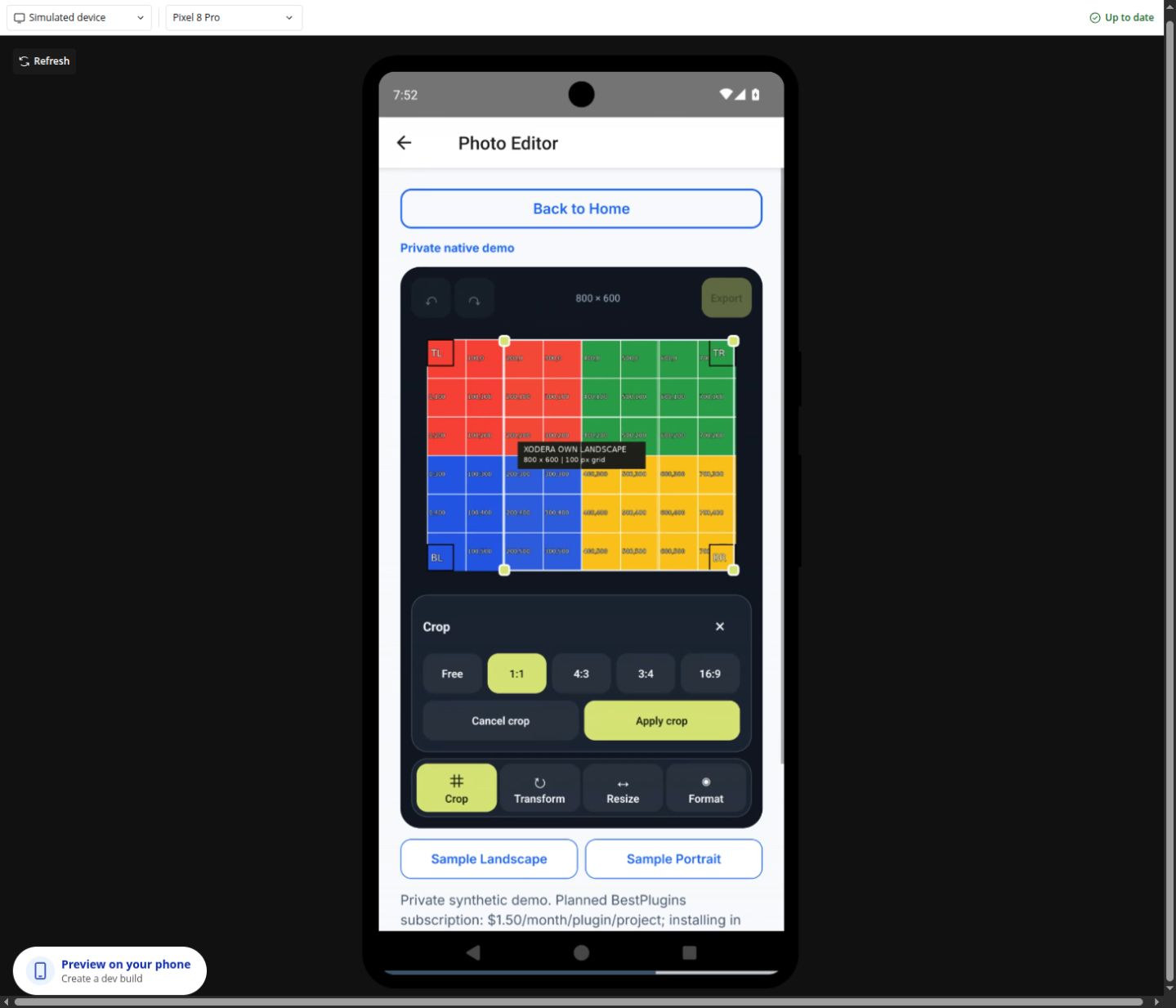
在 source_loaded 之后,运行 Begin crop。选择 1:1 作为头像,调整裁剪并使用 Apply crop。Cancel crop 保持图像不变。
如有需要,使用 Rotate、Flip 或 Resize。Undo 和 Redo 在已完成的编辑之间切换;Reset edits 恢复原始图像。
运行 Export image。在 export_completed 上,读取 output_uri、output_width、output_height 和 output_mime。使用您选择的文件保存工作流保存或上传该副本,然后将已保存的文件存储在记录中。
一次性配置
此插件计划启用密钥激活。在 BestPlugins → Dashboard → Plugins 中创建或选择您的 Bubble 应用项目。选择 Xodera Photo Editor Native,复制其密钥,然后打开 Bubble → Plugins → Xodera Photo Editor Native 并将其粘贴到 licensing_api_key。保存一次;随后使用以下操作。每个项目中的每个插件都有其自己的密钥。
首先使用您的应用选择或拍摄图像。将生成的可读取图像地址提供给编辑器。相机和相册权限归您使用的选择器所有。
一次性配置
- 在 BestPlugins → Dashboard → Plugins 中创建或选择您的 Bubble 应用项目。
- 选择此插件并复制其项目密钥。
- Open Bubble → Plugins → this plugin. Paste its project key into licensing_api_key and save.
- 添加元素,选择您的应用数据并构建以下工作流。
- In the dashboard, review and confirm the 7-day card trial for this plugin. It then costs US$1.50/month per app project, including development and production. Cancel before the trial ends to avoid the first charge.
安装和订阅
For Audio Player, Video Player, Photo Editor, Audio Recorder, Files Kit and Haptics: free Bubble installation, a 7-day trial with a card, then US$1.50 per month per plugin and app project. Development and production are included, with no operation cap. File-size and feature limits still apply. Review billing and cancellation before confirming. Other plugins remain unavailable for purchase.
将结果保存到您的应用中
将上传的或永久保存的图像保存到 Profile.image 或您的附件字段。output_uri 是设备上的临时文件,因此请先使用您选择的工作流保存该文件。然后将 output_width、output_height 和 output_mime 作为元数据存储。如果需要两个版本,请保留原始图像。
失败、取消与恢复
在 source_load_failed 或 editor_error 上,显示 error_code 并提供 Load source。Cancel operation 停止接受未完成的结果;在开始另一次编辑前请等待 is_busy=no。Clear session 清除编辑器,而不是已在其他位置保存的图像。
功能与限制
JPEG 和 PNG 导出;质量 0–1;最大输出边长 1–4096 像素。输入:最高 15 MiB 和 20 兆像素。最多 20 次已完成编辑。裁剪选项:自由,1:1,4:3,3:4 和 16:9。无内置相机、滤镜、文字叠加、透视校正、WebP 导出或自动上传。
设置、操作和结果
在 Bubble 中使用这些名称。计划中的功能会单独标记。
可用的测试版设置
元素设置
source_url · textdocument_context · textis_active · yes_nodisabled · yes_noshow_controls · yes_nocrop_aspect · textexport_format · textexport_quality · numberexport_max_dimension · numberallow_upscale · yes_noui_text_json · textlanguage · text状态
editor_status · textis_busy · yes_nohas_image · yes_nohas_changes · yes_nocan_undo · yes_nocan_redo · yes_noimage_width · numberimage_height · numberoutput_uri · textoutput_width · numberoutput_height · numberoutput_bytes · numberoutput_mime · texterror_code · textcrop_active · yes_nocrop_rect_json · text事件
source_loadedsource_load_failededit_appliededit_undoneedit_redoneeditor_resetexport_startedexport_completedoperation_cancellededitor_error操作及其输入
Load sourceBegin cropApply cropCancel cropRotateFlipResizeUndoRedoReset editsExport imageCancel operationClear session元素设置 · 12
source_urltext · 默认: ""- 示例值
https://bestplugins.online/native-samples/avatar.jpg - 示例 Bubble 表达式
Selected Profile's image_url - 所选音频、视频或图像文件的地址。使用此插件支持的文件类型。
document_contexttext · 默认: ""- 示例值
<current-user-id> - 示例 Bubble 表达式
Current User's unique id - 此账户或记录的稳定值。恢复其已保存的文件或草稿时使用相同的值。
is_activeyes_no · 默认: true- 示例值
yes - 示例 Bubble 表达式
GuideHost's view_is_active (your yes/no custom state) - 在此视图打开时设为是。离开时设为否,以便停止播放或当前工作。
disabledyes_no · 默认: false- 示例值
no - 示例 Bubble 表达式
GuideHost's is_busy (your yes/no custom state) - 当应用忙碌或此操作不可用时禁用该元素。
show_controlsyes_no · 默认: true- 示例值
yes - 示例 Bubble 表达式
App Settings' show_editor_controls - 显示或隐藏内置控件。
crop_aspecttext · 默认: "free"- 示例值
1:1 - 示例 Bubble 表达式
Avatar Settings' crop_ratio - 使用当前业务记录的值;根据以下限制进行验证。
export_formattext · 默认: "jpeg"- 示例值
jpeg - 示例 Bubble 表达式
Format Dropdown's value - 使用当前业务记录的值;根据以下限制进行验证。
export_qualitynumber · 默认: 0.85- 示例值
0.85 - 示例 Bubble 表达式
Image Settings' quality - 使用当前业务记录的值;根据以下限制进行验证。
export_max_dimensionnumber · 默认: 2048- 示例值
2048 - 示例 Bubble 表达式
Image Settings' max_side - 使用当前业务记录的值;根据以下限制进行验证。
allow_upscaleyes_no · 默认: false- 示例值
no - 示例 Bubble 表达式
Allow upscale Checkbox is checked - 使用当前业务记录的值;根据以下限制进行验证。
ui_text_jsontext · 默认: ""- 示例值
{} - 示例 Bubble 表达式
App Settings' player_labels_json (supported keys only) - 可选的 JSON,包含支持的按钮标签。留空则使用内置文本。
languagetext · 默认: "auto"- 示例值
uk - 示例 Bubble 表达式
Current User's preferred_language - 将 language=auto 设置为跟随支持的设备或浏览器语言。输入支持的语言代码以明确选择。
操作及其输入 · 13
Load source
无操作参数
Begin crop
无操作参数
Apply crop
origin_xnumber · 默认: —- 示例值
0 - 示例 Bubble 表达式
Crop Settings' x (or omit all rectangle inputs) - 使用当前业务记录的值;根据以下限制进行验证。
origin_ynumber · 默认: —- 示例值
0 - 示例 Bubble 表达式
Crop Settings' y (or omit all rectangle inputs) - 使用当前业务记录的值;根据以下限制进行验证。
widthnumber · 默认: —- 示例值
512 - 示例 Bubble 表达式
Resize Width Input's value:converted to number - 使用当前业务记录的值;根据以下限制进行验证。
heightnumber · 默认: —- 示例值
512 - 示例 Bubble 表达式
Resize Height Input's value:converted to number - 使用当前业务记录的值;根据以下限制进行验证。
Cancel crop
无操作参数
Rotate
degreesnumber · 默认: —- 示例值
90 - 示例 Bubble 表达式
Rotation Dropdown's value - 使用当前业务记录的值;根据以下限制进行验证。
Flip
axistext · 默认: —- 示例值
horizontal - 示例 Bubble 表达式
Flip Direction Dropdown's value - 使用当前业务记录的值;根据以下限制进行验证。
Resize
widthnumber · 默认: —- 示例值
512 - 示例 Bubble 表达式
Resize Width Input's value:converted to number - 使用当前业务记录的值;根据以下限制进行验证。
heightnumber · 默认: —- 示例值
512 - 示例 Bubble 表达式
Resize Height Input's value:converted to number - 使用当前业务记录的值;根据以下限制进行验证。
Undo
无操作参数
Redo
无操作参数
Reset edits
无操作参数
Export image
无操作参数
Cancel operation
无操作参数
Clear session
无操作参数
状态和事件
状态
editor_status · text此操作的当前结果。保存成功前请使用匹配的完成事件。
is_busy · yes_no工作仍在进行中。请在开始其他操作前等待。
has_image · yes_no所选项目的当前值。请在相关事件后读取。
has_changes · yes_no所选项目的当前值。请在相关事件后读取。
can_undo · yes_no所选项目的当前值。请在相关事件后读取。
can_redo · yes_no所选项目的当前值。请在相关事件后读取。
image_width · number所选项目的当前值。请在相关事件后读取。
image_height · number所选项目的当前值。请在相关事件后读取。
output_uri · text此设备上的文件位置。如果必须保持在线,请单独保存或上传文件。
output_width · number所选项目的当前值。请在相关事件后读取。
output_height · number所选项目的当前值。请在相关事件后读取。
output_bytes · number所选项目的当前值。请在相关事件后读取。
output_mime · text所选项目的当前值。请在相关事件后读取。
error_code · text上一次操作的错误信息。显示有帮助的提示并提供相应的重试。
crop_active · yes_no所选项目的当前值。请在相关事件后读取。
crop_rect_json · text所选项目的当前值。请在相关事件后读取。
事件
source_loaded当此事件发生时,从同一元素读取相关状态。
source_load_failed当此事件发生时,从同一元素读取相关状态。
edit_applied当此事件发生时,从同一元素读取相关状态。
edit_undone当此事件发生时,从同一元素读取相关状态。
edit_redone当此事件发生时,从同一元素读取相关状态。
editor_reset当此事件发生时,从同一元素读取相关状态。
export_started当此事件发生时,从同一元素读取相关状态。
export_completed当此事件发生时,从同一元素读取相关状态。
operation_cancelled当此事件发生时,从同一元素读取相关状态。
editor_error当此事件发生时,从同一元素读取相关状态。
开发者常问问题
output_uri 是 Bubble 文件吗?
不。它是本地缓存路径。在存储云文件引用之前,通过可靠的本地保存器或上传器持久化它。
订阅是如何运作的?
For Audio Player, Video Player, Photo Editor, Audio Recorder, Files Kit and Haptics: free Bubble installation, a 7-day trial with a card, then US$1.50 per month per plugin and app project. Development and production are included, with no operation cap. File-size and feature limits still apply. Review billing and cancellation before confirming. Other plugins remain unavailable for purchase.
相关指南
如需帮助,请告知我们您使用的插件和设备、尝试的操作以及发生的情况。请使用不含个人数据的示例。切勿分享您的密钥或私有文件。